Your business,
on autopilot.
One platform for creating, running and growing your business, powered by AI.
AI Agents for Business: What to Deploy First, Department by Department





Last updated: September 2026
AI agents for business are already in production at 57% of the companies LangChain surveyed, and Gartner expects over 40% of agentic AI projects to be canceled by the end of 2027. Both numbers are true at once. LangChain's survey drew 1,340 responses, most of them from technology companies, so it leans toward early adopters. Gartner blames the cancellations on escalating costs, unclear business value, and inadequate risk controls.
What separates the agents still running from the canceled projects is rarely the model. It is which department got the agent first, how the agent was acquired, and how quickly it was allowed to act without asking. This guide to AI agents for business is for founders and operators at companies of any size, from five people to a few hundred, deciding where agents belong. If you run a very small business and just want your first job to hand over, our guide to AI agents for small business goes narrower.
- Support, research and reporting, and internal operations are the proven lanes. They are also the top three use cases in LangChain's data: 26.5%, 24.4%, and 18% of respondents
- Buy the agent inside a tool you already use, configure a general platform for work that crosses tools, and build only when the workflow is your competitive advantage
- Roll out internal before external, read before write, and reversible before irreversible
- Every agent needs a named human owner. Unowned agents are how pilots quietly become the 40%

What AI Agents for Business Actually Are
An AI agent for business is software you give an outcome instead of a click path. It reads your systems, decides the steps, uses tools such as your CRM, inbox, or a browser to carry them out, and either reports back or takes an approved action. Some run on a schedule or react to events without anyone prompting them, which is the line we drew in AI employee vs AI agent.
That separates agents from the two things they are most often confused with:
| Chatbot | Workflow automation | AI agent | |
|---|---|---|---|
| How work starts | A person asks | A fixed trigger | A prompt, a schedule, or an event |
| Handles variation | Only in conversation | No, breaks on edge cases | Yes, within its instructions |
| Can act in your tools | Rarely | Yes, on predefined steps | Yes, and chooses the steps |
| Best for | Answering questions | Identical, high-volume steps | Repeatable work that varies case to case |
Be skeptical of the label. Gartner estimates that only about 130 of the thousands of vendors claiming agentic AI are real, and calls the rest "agent washing": chatbots and scripted automation renamed. If a product cannot choose its own steps or act in another tool, it belongs in one of the first two columns.
AI Agents for Business, Department by Department
Agents are not equally ready everywhere. McKinsey's State of AI survey found 62% of organizations experimenting with agents, but no more than about 10% scaling them in any single function. Most companies have them working in one or two departments. The useful question is which one or two.
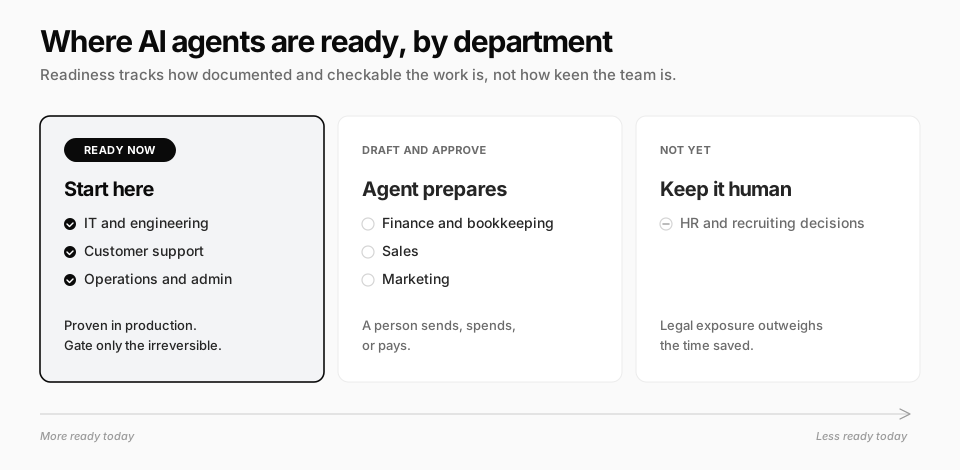
Customer support
The most proven lane, and the most overdone. Klarna's AI assistant handled 2.3 million conversations in its first month, two-thirds of all its support chats. By May 2025 the company was recruiting human agents again after its CEO said the cost-cutting had produced lower-quality service.
The lesson is not that support agents fail. It is that deflection has a ceiling. Hand over: order status, access problems, policy questions, triage and tagging. Keep human: upset customers, exceptions, and any refund decision, which should sit behind an approval.
Sales
Agents are strong at preparation and weak at persuasion. Hand over: lead enrichment, account research before a call, CRM cleanup, and drafting follow-ups for a rep to send. Keep human: the conversation, pricing, and negotiation. Fully automated outbound at volume is the fastest way to burn a sending domain, which is why the list itself needs verified contacts from real data tools before an agent writes a word.
Marketing
Hand over: first drafts, repurposing one piece into several formats, and weekly campaign reporting. Keep behind approval: anything that spends ad budget or publishes under your brand. The work is cheap to draft and expensive to get wrong in public. Our guide to AI agents for marketing goes job by job.
Finance and bookkeeping
Start read-only. Categorizing transactions, reconciling payouts against orders, building the weekly summary, and flagging overdue invoices are high-repeat and easy to check. Keep human: money going out and anything touching a tax filing.
Operations and admin
The unglamorous winner for agents that can use a browser. Supplier portals, government forms, and marketplace back ends often have no API, so traditional automation cannot reach them. An agent that can log in and click through them can.
IT and engineering
The most mature technically: coding agents and internal helpdesk agents are where many engineering teams already have production experience. Password resets and access requests work well, provided access grants go through an approval step.
HR and recruiting
The least ready, for legal rather than technical reasons. New York City's Local Law 144 requires an annual independent bias audit before an automated tool can help decide who gets hired, and similar rules are spreading. Hand over: interview scheduling, onboarding checklists, and policy questions. Keep human: screening and every decision about a person.
Buy, Configure, or Build Your Business AI Agents
Build versus buy is really a three-way choice, because a third option now covers most of the middle.
| Buy | Configure | Build | |
|---|---|---|---|
| What it is | The agent inside a tool you already pay for, such as your helpdesk or CRM | A general agent platform you instruct in plain language and connect to your tools | Your own agent on model APIs and an agent framework |
| Time to first result | Days | Days to weeks | Months |
| Who maintains it | The vendor | You, in plain language | Your engineers, permanently |
| Crosses tools | No, stays inside one product | Yes | Yes |
| The catch | Only as good as that one tool's data | You still have to specify the work precisely | Evaluation, monitoring, and upkeep become your job |
The market has voted. Menlo Ventures found that 76% of enterprise AI use cases were purchased rather than built in 2025, up from 53% the year before.
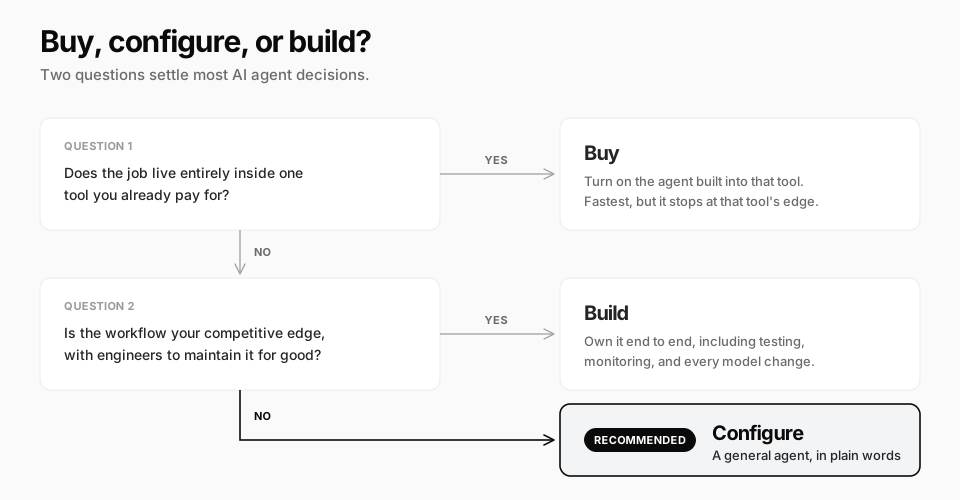
The hidden cost of building is not the first version. It is everything after it. Quality is the top barrier to production in LangChain's data (32% of respondents), and 89% of respondents have implemented observability just to see what their agents are doing. When you build, that tooling is yours to build too.
What to Deploy First: The Rollout Order
Whichever department you start in, the order of autonomy matters more than the tool. Three rules cover most of it:
- Internal before external. A wrong internal report costs an afternoon. A wrong customer email costs trust
- Read before write. An agent that only reads your data cannot break anything, and it shows you how it reasons before you give it more
- Reversible before irreversible. A draft can be deleted; a refund, a payment, or a published post cannot
In practice, a sensible rollout for one department looks like this:
- Weeks 1-2: a read-only report. The numbers someone assembles by hand every Monday. Check it against the manual version
- Weeks 3-6: drafts behind approval. Follow-ups, replies, reconciliations. You approve each one and note what you change
- Week 7 onward: approved actions on a trigger. Once edits drop close to zero, let it run on a schedule or react to events, still asking before anything irreversible
- Only then: the second department. It will go much faster, because the hard part of the first was writing your process down
How the Answer Changes With Company Size
The same principles apply at every size, but the first move differs.
| 1-10 people | 10-100 people | 100+ people | |
|---|---|---|---|
| Best first lane | The owner's weekly admin and reporting | Support triage or sales prep in one team | One function, chosen by where work is most documented |
| Who owns the agent | The founder | A team lead, named in writing | A function owner plus IT or security |
| Lean toward | Configure | Buy inside core tools, configure across them | Buy and configure; build only the differentiating workflow |
| Biggest risk | Delegating judgment too early | Agents nobody owns after the person who set them up leaves | Pilots that never reach production |
Five Questions Before You Connect Anything
Governance sounds like a large-company concern. It is really five questions, and they matter just as much with three employees:
- Who owns this agent? One named person who reviews its output and gets told when it fails
- What can it touch? The minimum access the job needs, per agent rather than per company
- Where do the credentials live? Never pasted into a chat. Use saved logins or connected accounts the agent can use without seeing
- What needs approval? Money moving, messages to customers, deletions, and anything public
- What does a bad run cost? Usage-based pricing means a runaway job has a real bill. Set limits before the first schedule
Where Crevio Fits
Crevio is an AI business builder: you describe what you want to sell, and its AI builds the business, launches it, and works on growing it. In the buy, configure, or build table above, it sits in the configure column, with the difference that your products, Stripe-powered checkout, subscriptions, and customer records live in the same place the agent works.
What that looks like against the rollout order in this guide:
- Tasks on a schedule or an event. A task can run daily or weekly, or fire when an order is paid, a lead comes in, a booking is made, or a subscription payment fails
- Three approval levels per task: autonomous, supervised (approval before anything that writes), and read-only for analysis. That maps directly onto read before write
- Approval cards in the chat for anything set to ask first. Connected apps ask before they write by default; switch sends, ad changes and anything else that spends to "Ask for confirmation" or run the task supervised
- 3,000+ integrations, so it works in the CRM, inbox, and ad accounts you already use
- Its own computer with a browser, for the portals and back ends with no API, plus saved logins it can fill in without the password appearing in the chat
- Separate bots with their own toolsets and saved-login access, so each one gets only what its job needs
- Results delivered where you already work: email, Slack, Telegram, or Discord
Where it is the wrong choice: if all you need is ticket deflection inside an established helpdesk, the helpdesk's own agent is the simpler buy. If you have engineers and a workflow that is your competitive advantage, build that one. Crevio does not handle physical products, inventory, or shipping, and it is not a Shopify replacement. Transaction fees apply on every plan (5% on Starter, 2.5% on Pro, 1% on Business).
Starter is free with 20 AI credits a month. Pro is $20/month with 1,000 credits, and Business is $50/month with 2,500 credits, a custom domain, and unlimited seats. Nobody's agents are fully autonomous today, ours included. What you get is an agent that does real work across your business, asks first wherever you tell it to, and takes on more as you loosen the approvals.
What Nobody Tells You
- The most enthusiastic department is rarely the most ready one. Readiness is about how well the work is written down, not how much the team wants help
- Agents outlive the people who set them up. When the owner leaves, the agent keeps running on instructions nobody remembers writing. Put ownership in the handover checklist
- Approval moves the bottleneck to the approver. Ten agents that each ask twice a day means twenty interruptions. Approve categories of action, not every instance, once the edits stop
- Your data is messier than the demo. Duplicate customers and inconsistent product names break agents faster than hard reasoning does. The first week is often cleanup
- Pilots are judged on good days. Run the agent beside the manual process for at least one bad week (a month-end or a launch) before you switch the manual process off
AI Agents for Business FAQ
Which department should use AI agents first?
The one whose recurring work is best documented and easiest to check, which is usually internal reporting, support triage, or finance reconciliation. Enthusiasm is a poor guide. Start read-only, move to drafts behind approval, and only then let the agent act on its own.
Should a business build or buy AI agents?
Buy when the job lives inside one tool you already use. Build when the workflow is your competitive advantage and you have engineers to maintain it indefinitely. For most work that crosses several tools, configuring a general agent platform is faster than building and more flexible than a single-tool agent.
How much do AI agents cost for a business?
Platform subscriptions range from free tiers to a few hundred dollars a month for small teams, while custom builds cost engineering time plus model usage. The line item that surprises people is usage: most platforms meter credits or tokens, so set spending limits per agent before enabling schedules.
Are AI agents safe to connect to business systems?
They are as safe as the access you give them. Grant the minimum each agent needs, keep money, customer messages, and deletions behind approval, avoid pasting credentials into chats, and make sure every agent has a named owner who reviews its runs.
Will AI agents replace employees?
On current evidence they absorb the recurring, documented part of roles rather than whole jobs. Klarna's reversal is the clearest example of what happens when the second is attempted too early. We compared the economics in AI business builder vs hiring a team.
Pick the department whose work is already written down. The agent will not write it down for you.
Related Blog Posts
What will you sell today?
Describe what you want to sell — Crevio builds, launches, and grows it. Products, payments, and marketing, all on autopilot.
Start for free

