Your business,
on autopilot.
One platform for creating, running and growing your business, powered by AI.
AI Agent Email Inbox: Its Own Address, or Access to Yours?





Last updated: September 2026
An AI agent email inbox is one of two very different things: an address the agent owns, or a key to the inbox you already have. The first lets people and systems send work to the agent. The second lets the agent sort, draft, and answer the mail that lands on you. Most people want a bit of both, and most of the trouble starts when they mix the two up.
This guide is for business owners deciding how to put an agent on email. It covers what each setup is good for, the tools behind each, and the four ways it goes wrong: prompt injection, unreviewed sending, deliverability, and privacy.
- Its own inbox is the safer start. The agent gets a separate address, you decide who may write to it, and a mistake does not carry your name
- Access to your inbox saves more time and carries more risk. It reads everything, including mail written by strangers
- Every email an agent reads is untrusted input. Treat instructions inside an email as data, never as orders
- Sending is the line to hold. Let the agent read, sort, and draft freely. Make it ask before anything leaves
Quick Comparison
| AgentMail | Shortwave | Fyxer | Crevio | |
|---|---|---|---|---|
| Setup | Agent gets its own inbox (API) | AI email client for your inbox | Assistant inside your Gmail or Outlook | Assistant with its own address, plus access to a connected Gmail |
| Who it is for | Developers building agents | People living in Gmail | Busy inbox owners | Business owners running their business with an agent |
| Sends by itself? | Your code decides | You send, or AI filters act on rules | Never, drafts only | Replies to approved senders; connected Gmail asks before sending |
| Starting price | Free (3 inboxes), $20/mo Developer | $30/seat/mo, 14-day trial | Free plan, Pro $32/mo billed annually | Free plan, Pro $20/mo |
What "AI Agent Email Inbox" Actually Means
Search for the phrase and two kinds of results come up side by side: developer tools that give an agent an address of its own, and assistants that work inside Gmail or Outlook. They solve different problems.
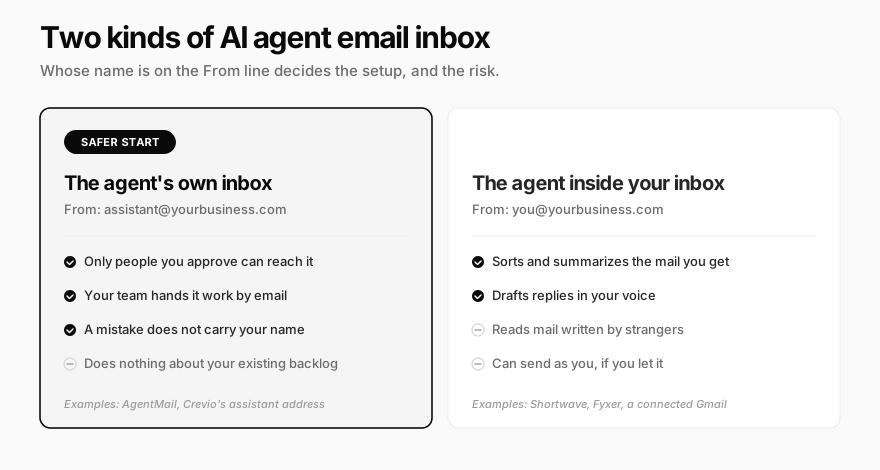
The easy way to tell them apart is to ask whose name is on the "From" line.
The agent's own inbox. The agent has an address such as [email protected]. You forward it receipts, your team emails it requests, a supplier replies to a message it sent. It reads, acts, and answers from its own identity. Nothing in your personal inbox is exposed.
The agent inside your inbox. The agent connects to your Gmail or Outlook account. It labels, archives, summarizes, and drafts replies to the mail people send you, and it can send as you if you let it. This is what most people mean by AI inbox management or AI email triage.
A useful rule of thumb: if the job is "let people hand the agent work," give it an address. If the job is "deal with my backlog," give it access. If you want both, keep them separate so a problem in one does not spill into the other.
Option 1: Give the AI Agent Its Own Email Inbox
An agent with an address becomes something you can delegate to by email, the way you would to an assistant. That sounds small, but email is the one channel every supplier, customer, and tool already speaks.
Good jobs for an agent-owned inbox:
- Forwarding. You forward an invoice, a contract, or a customer complaint with one line: "file this," "summarize the terms," "draft a reply I can send."
- Team requests. Anyone on the team emails the agent instead of pinging you.
- Outbound conversations. The agent writes to a vendor or partner and handles the reply thread from its own address.
- A known contact list. A supplier, bookkeeper, or partner gets the agent's address for routine back-and-forth such as quotes, scheduling, and paperwork.

For developers, AgentMail is one of the best-known options. It gives each agent a real inbox through an API, with threads, attachments, and webhooks when new mail arrives. Its pricing starts with a free tier of 3 inboxes and 3,000 emails a month, then $20 a month for 10 inboxes and custom domains, and $200 a month for 150 inboxes. If you are building your own agent, this is a sensible foundation.
If you are not building an agent, an inbox API on its own does little. You still need the agent, the logic for what it does with each email, and a way to approve its replies. That is where business tools with a built-in agent address fit, which we come back to below.
Option 2: An AI Agent That Manages Your Inbox
The second setup is about your mail, not the agent's. The agent sorts what arrives, surfaces what needs you, and prepares replies.
What these tools typically do:
- Triage. Sort mail into groups such as "to respond," "FYI," and "marketing"
- Drafts. Write replies in your tone for you to edit and send
- Summaries. Condense long threads into a few lines
- Rules in plain language. "Archive newsletters I have not opened in a month"
Shortwave replaces your Gmail client with an AI-native one. Its plans run $30, $45, and $120 per seat per month, and include AI filters that can label, archive, delete, or star new mail based on a prompt you write. Every plan has a 14-day free trial.
Fyxer stays inside your existing Gmail or Outlook, sorts mail into categories, and drafts replies. It has a free plan, and Pro costs $32 a month billed annually or $49 month to month, per its pricing page. Notably, Fyxer states it never sends email for you. It only drafts. That is a deliberate design choice, and a good one.
These tools are strong at the inbox itself. What they generally do not do is act on the rest of your business: update a customer record, refund an order, or build the product page a customer asked about. That gap is the difference between an email assistant and an agent that happens to use email.
Four Ways an AI Agent Email Inbox Goes Wrong
Both setups share the same failure modes. They are all fixable, but only if you set them up before you turn the agent on, not after the first incident.
1. Prompt injection arrives by email
An email is text written by whoever sent it. When an agent reads that text, it can mistake instructions inside the message for instructions from you. OWASP ranks prompt injection as the top risk for AI applications, and calls out "indirect" injection: hostile instructions hidden in content the model reads, such as a web page, a file, or an email.
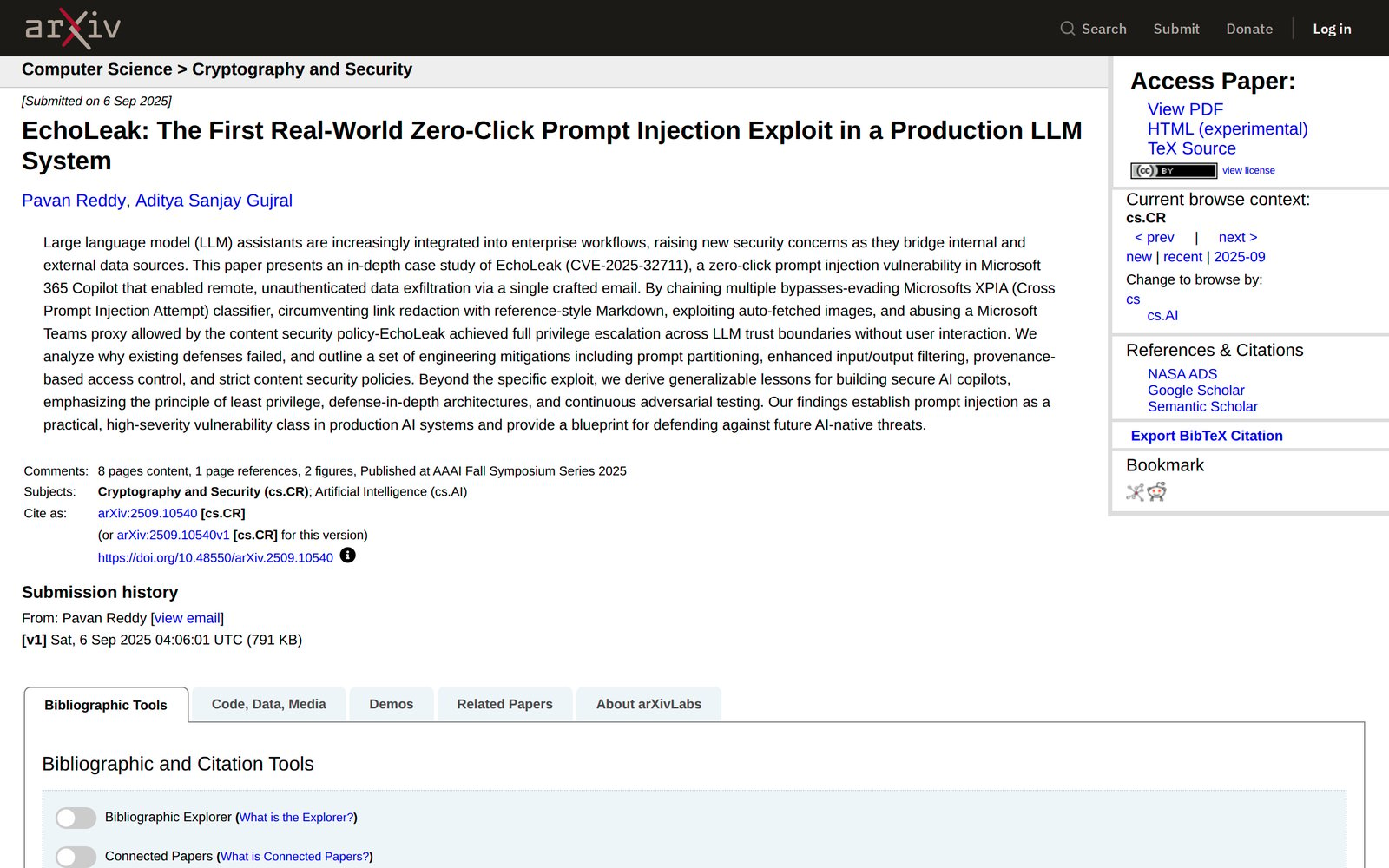
This is not theoretical. In June 2025, researchers disclosed EchoLeak (CVE-2025-32711), a flaw in Microsoft 365 Copilot where a single crafted email could make the assistant pull internal data and leak it to an outside server, with no click from the victim. Microsoft patched it, but the pattern remains: any agent that reads mail from strangers can be addressed by strangers.
What helps:
- Limit who can give the agent work. An agent-owned inbox that only accepts mail from you and your team shrinks the attack surface from "the internet" to "people you know"
- Separate reading from acting. An agent triaging your inbox should be able to label and draft without being able to send, delete, or pay
- Screen before the model reads. Some tools now filter inbound mail first. AgentMail advertises exactly this for its inboxes
- Watch for "urgent" requests to move money or data. The same social engineering that works on people works on agents
2. The agent sends on your behalf without review
A draft you never read, sent under your name, is the fastest way to lose a customer. Worse, the damage is already done by the time you notice. We covered where to draw the approval line in human in the loop AI agents, and email is the clearest case for it.
A sensible default: the agent may read, search, label, and draft. Sending, forwarding, and deleting wait for a yes. Loosen that only for narrow, boring cases, such as confirming receipt of an invoice, after you have watched the agent handle a few dozen of them well.
3. Deliverability of agent-sent mail
Mail an agent sends still has to reach the inbox. Gmail's sender guidelines require SPF or DKIM for every sender, and bulk senders of 5,000 or more messages a day need SPF, DKIM, and DMARC plus one-click unsubscribe. Every sender must keep the spam rate reported in Postmaster Tools below 0.3%.
Agents add their own ways to break this:
- Volume spikes. A new agent address that sends hundreds of cold emails in its first week looks like a spammer
- Reply loops. Two automated systems answering each other can generate thousands of messages overnight. An agent should never auto-reply to no-reply addresses, bounce messages, or mailing lists
- Sending as you from a new tool. If the agent sends from your domain through a service your DNS records do not authorize, those messages fail authentication
4. Privacy
Granting inbox access gives the agent everything in it: contracts, health notes from a client, a password reset link. Ask three questions before you connect:
- Whose mail is it? Connecting a shared or team inbox exposes colleagues' conversations, not just yours
- Where does it go? Email content is sent to an AI model to be read. Check where that happens and whether it is kept or used for training
- Can you narrow it? Some setups let you limit the agent to certain labels or senders. A narrow scope is a smaller blast radius
For many businesses, this alone is a reason to start with an agent-owned address: the agent only ever sees what someone chose to send it.
A Safe Setup for Your AI Agent Email Inbox
Put together, the defenses form a simple pipeline. Mail has to pass a sender check before the agent reads it, and anything that leaves on your behalf passes through you first.
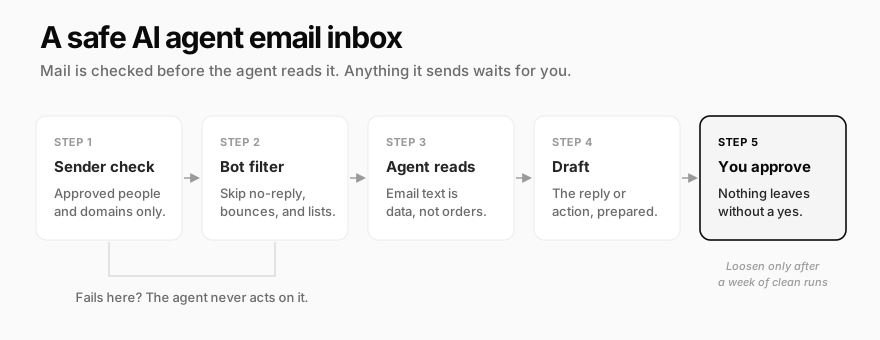
A short checklist to run before switching it on:
- Decide the setup. Own address, access to yours, or both kept apart
- Set who may write to the agent. Specific addresses or your company domain, nobody else
- Block automated senders. No replies to no-reply addresses, bounces, mailing lists, or other bots
- Set sending to "ask first." Reading, searching, labeling, and drafting can run on their own
- Authenticate the sending domain before the agent sends anything from it
- Review a week of activity before you loosen a single permission
If the agent also runs on a schedule, such as a morning inbox digest, the same rules apply. Our guide to recurring AI agent tasks covers how to make scheduled runs fail loudly rather than quietly.
How Crevio Handles Email
Crevio is an AI business builder: you describe what you want to sell, and its agent builds the store, takes payments, and works on growing sales. Email is one of the ways you reach that agent, and both setups above are covered.
Its own address. Every Crevio account gets an assistant address in the form [email protected]. Email it a request, attach a file, and it reads the message, does the work, and replies in the same thread. Connect your own domain and it can receive at your domain instead.

Only approved senders get through. The account owner is approved by default. You add other people by exact address, or approve a whole domain so your team can reach it. Mail from anyone else is never acted on. Messages from no-reply addresses, bounces, mailing lists, and other automated senders are skipped too, which prevents reply loops.
Approvals come back by email. If a task you started by email hits an action that needs your approval, you get an email with Approve and Deny links. One click decides it, no login needed, and the result follows by email.
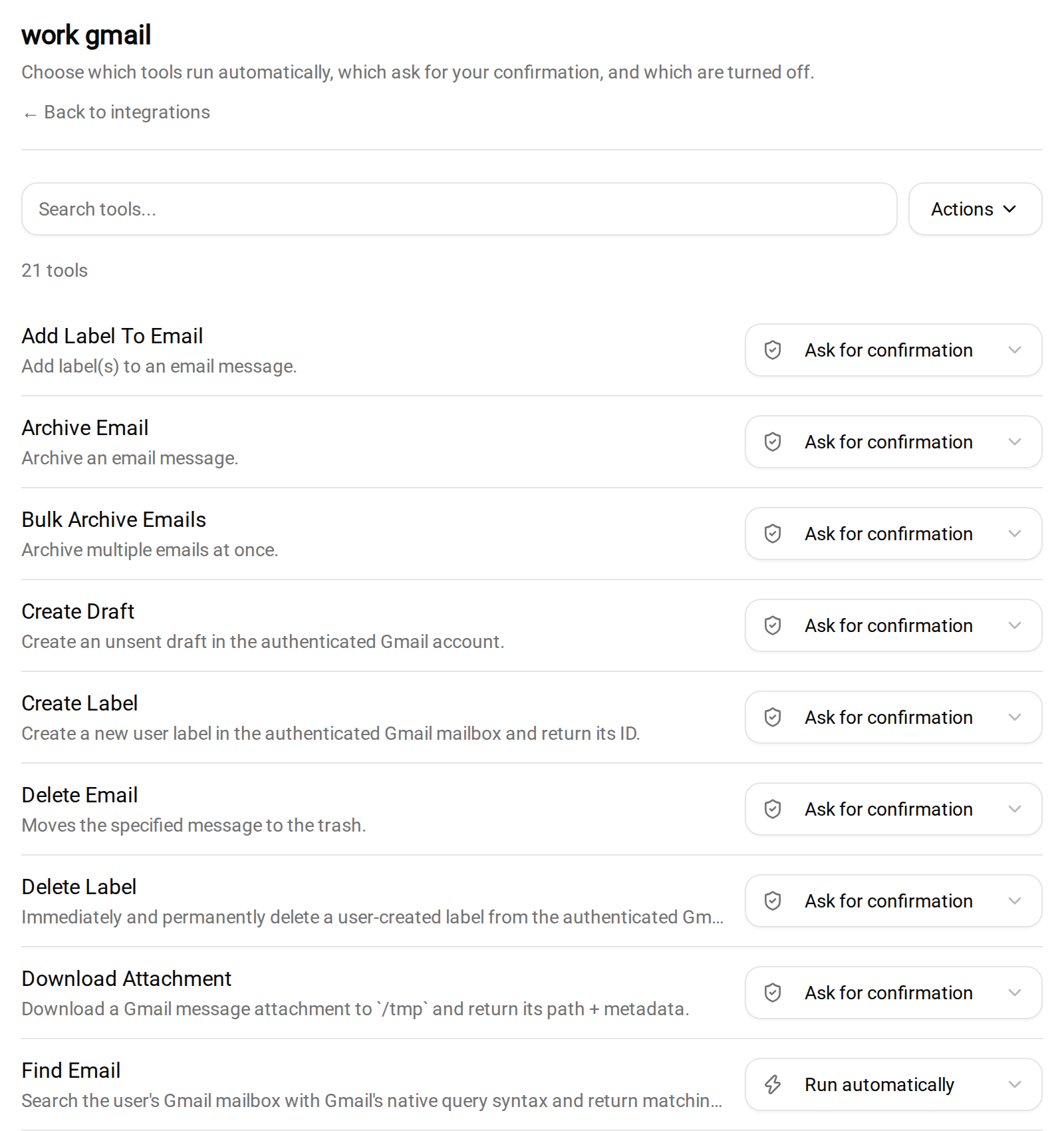
Your Gmail, with per-action approvals. Connect Gmail and the agent can search, read threads, label, draft, and send. Each action has its own setting: run automatically, ask for confirmation, or off. By default, reading and searching run on their own, while drafting, labeling, archiving, deleting, and sending all ask first.
Tasks that start when mail arrives. With Gmail connected, you can set up a task that runs whenever a new email lands, for example "when an invoice arrives from my accountant, file it and tell me the total." Filter the trigger to the senders you care about so the agent does not spend credits reading every newsletter.
Where it falls short, plainly:
- It is not an email client. There is no triage view to replace Gmail, Shortwave, or Fyxer. If sorting a busy personal inbox is the whole job, a dedicated tool fits better
- Crevio's own actions do not ask by default. The approval defaults above apply to connected apps. Actions inside Crevio, such as sending an email campaign to your list, run without asking unless you tell the agent otherwise
- Every email the agent works on uses AI credits. The free Starter plan includes 20 credits a month, Pro ($20/month) 1,000, and Business ($50/month) 2,500. Our breakdown of AI agent running costs explains what drives usage
- The "Powered by Crevio" signature on assistant replies can only be replaced or removed on the Business plan
FAQ
Yes. Developer tools such as AgentMail create inboxes for agents through an API, and some business platforms, including Crevio, give their built-in assistant an address out of the box. The agent receives mail, acts on it, and replies from its own identity rather than yours.
It can be, with limits. Keep sending, forwarding, and deleting behind your approval, restrict who can give the agent instructions, and treat every email as untrusted text. Prompt injection through email is a documented, real attack, so an agent with broad access and no review is the risky setup.
If you want your existing inbox sorted and drafted, a dedicated assistant such as Fyxer or an AI client such as Shortwave is built for exactly that. If you want an agent that also acts on your business, such as orders, customers, and products, pick one that connects to your inbox with per-action approvals.
The Short Version
Give the agent an address before you give it your keys. An AI agent email inbox that only hears from people you approved, and only sends what you have seen, does most of the useful work with a fraction of the risk. Widen it one permission at a time, and only after it has earned it.
Related Blog Posts
What will you sell today?
Describe what you want to sell — Crevio builds, launches, and grows it. Products, payments, and marketing, all on autopilot.
Start for free

