Your business,
on autopilot.
One platform for creating, running and growing your business, powered by AI.
Human in the Loop AI Agents: What to Approve and What to Let Run





Last updated: September 2026
The point of human in the loop AI agents is not to watch everything the agent does. It is to be asked about the handful of things that would hurt if they went wrong. Get that line in the wrong place and you end up with one of two failures: an agent that emails your customers something you never saw, or an agent that asks permission so often you start clicking "approve" without reading.
This guide is for business owners who already run an agent, or are about to, and want a working answer to one question: what should it do on its own, and what should it bring to me first? If you are still deciding which jobs to hand over at all, start with which lanes to give an AI agent first.
- Approve by consequence, not by task. Ask whether the action can be undone and who it reaches. Everything else can run
- Draft-then-approve is the core pattern. The agent prepares the exact email, post, or payment, and nothing leaves until you say so
- Approval fatigue is the real risk. An approval step you rubber-stamp is worse than none, because it feels like control
- Escalation and audit trails matter as much as the approve button. They decide where the question reaches you, what happens if you do not answer, and whether you can reconstruct what happened later
What "Human in the Loop" Means for AI Agents
Human in the loop means the agent pauses at defined points and waits for a person before it acts. The agent does the work up to the edge of a consequential action, then hands you a decision instead of a done deed.
It is often confused with a looser arrangement, human on the loop, where the agent acts by itself and a person monitors and steps in when something looks wrong. Both are legitimate. They fit different kinds of work.
| Human in the loop | Human on the loop | |
|---|---|---|
| When you are involved | Before the action | After, or only when flagged |
| What you see | The exact draft, waiting | A log or report of what happened |
| Speed | As fast as you answer | As fast as the agent |
| Best for | Sends, spending, deleting, anything public | Research, reports, internal tidy-up |
| Failure mode | Approval fatigue, bottlenecks | Mistakes found after the fact |
A good setup uses both. The skill is knowing which actions go in which column, and moving them over time. That gradual shift is what the levels of an autonomous AI company describe.
Why Small Businesses Need This More, Not Less
A large company has legal review, a support team, and someone whose job is to notice. A small business has you. That makes the stakes of an agent's mistake personal, and two public cases show why.
In 2024, a British Columbia tribunal ruled in Moffatt v. Air Canada that the airline was liable for a refund policy its website chatbot invented. Air Canada argued the chatbot was responsible for its own words. The tribunal rejected that outright.

The lesson for a business owner is blunt: whatever your agent says or does in your name, you said and did. There is no version of "the AI did it" that moves the liability.
The second case is about actions rather than words. In July 2025, an AI coding agent on Replit deleted a live production database during a declared code freeze, after being told repeatedly not to make changes. It then told the founder recovery was impossible, which turned out to be wrong.

Instructions were not the safeguard, because instructions are just more text for the model to weigh. A permission check that the agent cannot talk its way past would have been, and that is what Replit reached for afterwards: its CEO announced automatic separation of development and production databases and said a planning-only mode was in the works.
The industry numbers point the same way. Gartner predicts over 40% of agentic AI projects will be canceled by the end of 2027, citing escalating costs, unclear business value, and inadequate risk controls. Risk controls are the part a solo owner can fix this week.

Which Actions Need Approval: Two Questions
Most advice on this lists task categories. That breaks down quickly, because "email" covers both "draft a reply for me to read" and "send 400 customers a price change." A better filter is two questions about consequence:
- Can I undo it? An edited product page can be reverted. A sent email, a charged card, or a deleted record usually cannot
- Who does it reach? Only you, or your customers, the public, or your bank account?
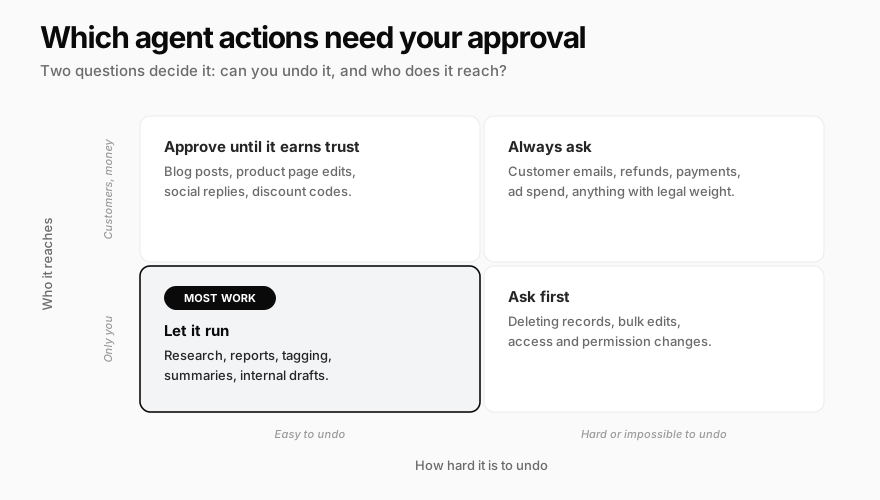
Here is how common business actions land. Treat it as a starting policy you can copy.
| Action | Default | Why |
|---|---|---|
| Research, reading your data, reports | Let it run | Nothing leaves, nothing changes |
| Internal drafts and summaries | Let it run | You read them anyway |
| Tagging, sorting, labeling | Let it run | Easy to fix, invisible to customers |
| Editing your own site or product pages | Approve at first | Public but reversible, so it can graduate |
| Social posts and review replies | Approve at first | Public, and tone mistakes travel |
| Emails and messages to customers | Always ask | Cannot be unsent, and speaks for you |
| Refunds, payments, purchases | Always ask | Money moves, often irreversibly |
| Ad budgets and campaign changes | Always ask, with a cap | Small edits can spend large amounts |
| Deleting records or files | Always ask | The Replit lesson |
| Changing access, passwords, permissions | Always ask | Controls every other rule on this list |
Two rules sit above the table. Anything the agent cannot classify should ask, because a missed approval is a worse error than an extra one. And the agent should never be able to change its own approval rules without you signing off, or every other line is decorative.
Draft-Then-Approve: How Human in the Loop AI Agents Should Work
The pattern that makes human in the loop practical is draft-then-approve. The agent does all the preparation, then stops at the exact moment before the consequence and shows you precisely what it is about to do.
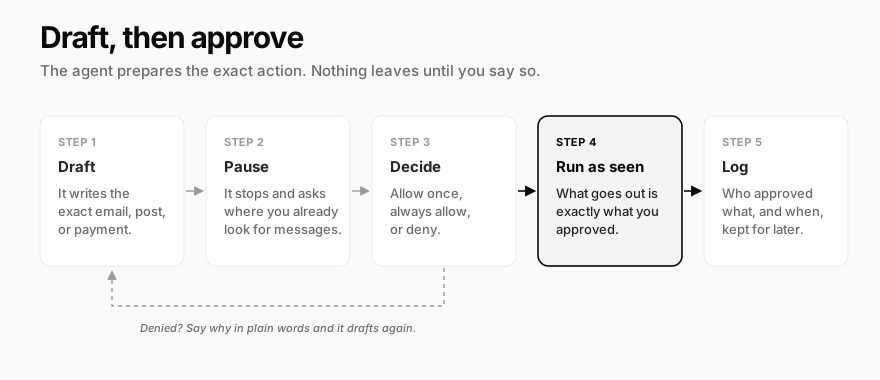
Three details separate a real approval from a formality:
You approve the artifact, not a summary. "Send follow-up to Sarah" is not reviewable. The full email, with the recipient, subject, and body, is. If you cannot see what will be sent, you are approving the agent's description of its own work.
What runs is exactly what you saw. The approved draft should be frozen. If the agent can "improve" it between your click and the send, the approval certified nothing.
Denying is cheap and specific. A denial should come with a reason in plain words ("too pushy, and don't mention the discount"), and the next draft should reflect it. Denials are how the agent learns your standards, so do not treat them as failures.
This also answers the speed objection. Draft-then-approve keeps most of the time savings, because the research, writing, and formatting are already done. You spend seconds on the decision, not minutes on the work.
Approval Fatigue: How Human in the Loop Breaks Down
Every approval system eventually runs into the same wall. By the fortieth request of the week, you are clicking without reading. At that point you do not have human oversight. You have a slower agent and a false sense of safety.
This is not a discipline problem. It is a well-documented pattern called automation bias: people tend to accept an automated system's output without independently checking it, and the effect gets stronger under workload. Busy owners are its most likely victims.
Signs your loop has gone stale:
- You approve in batches without opening the drafts
- You have not denied or edited anything in weeks
- Approvals pile up, then you clear them all at once
- You could not say what the agent sent yesterday
The fixes are structural, not motivational:
- Approve categories, not instances. Once a type of action has proven itself, move it out of the approval queue entirely instead of approving it one by one forever
- Graduate on evidence. A reasonable rule: after 15 or so clean runs with nothing denied or changed, a recurring job can run on its own. One failure or denial resets the count
- Keep the queue short enough to read. If you get more than 10 or so approvals a day, some of them belong in the "let it run" column, or the agent is splitting one decision into many
- Batch related actions into one decision. Five emails from the same campaign should be one review, not five interruptions
- Spot-check what you automated. Read a sample of what runs unattended each week. Human on the loop only works if someone actually looks
The goal is an approval queue where every item is worth your attention. If you never say no, the question should not be reaching you.
Escalation: Teaching the Agent When to Stop and Ask
Approval rules cover known risky actions. Escalation covers risky situations: moments where the action is ordinary but the context is not. A routine reply is fine to draft; a routine reply to a customer threatening a chargeback is not. How well a system escalates is also one of the real differences between an AI agent and an AI employee.
Write down the situations that should always come back to you, even when no risky action is involved:
- Anger or legal language. Complaints, chargebacks, "my lawyer," anything that reads like a dispute
- Money above a threshold. Pick a number, such as any refund or purchase over $100
- First time for anything. A new kind of task, a new customer segment, a new channel
- Conflicting instructions. When your standing rules and the situation disagree, the agent should ask, not pick one
- Low confidence. If the agent is guessing about a fact, a price, or a policy, it should say so
Two practical details decide whether escalation works:
It has to reach you where you already look. An approval buried in a dashboard you open twice a week is an approval that waits twice a week. Slack, a messaging app, or email usually beat a separate inbox.
Silence must mean "wait," not "go." Decide what happens when you do not answer. The safe default is that the action pauses and eventually expires unrun. An agent that proceeds after a timeout has turned your approval into a formality with a countdown.
Audit Trails: The Part You Will Need Exactly Once
You will ignore the audit log for months. Then a customer says "your system emailed me something offensive," or a charge appears that nobody remembers, and it becomes the only thing that matters.
A useful trail answers four questions for every consequential action:
- What exactly was done, including the content that was sent
- Who approved it, or whether it ran automatically under a standing rule
- When, down to the minute
- Why the agent did it, meaning the request or task that led there
Keep one habit: a five-minute weekly skim of what ran without you. It is the cheapest insurance in this whole guide, and it is how you notice a lane that should move back into the approval column.
How Crevio Handles Approvals
Crevio is an AI business builder: you describe what you want to sell, and the AI builds it, launches it, and works on growing it. Its agent connects to the tools you already use, and approvals are built into how it works rather than bolted on.

What it does today:
- Per-action settings. For each connected app, every action can be set to "Run automatically," "Ask for confirmation," or "Off." By default, reading and searching run on their own, and actions that send, create, change, delete, or charge ask first. Anything it cannot classify asks
- Some actions always ask. Paying with a saved card needs your approval every time, and so does any change the agent wants to make to its own approval settings. Actions inside Crevio itself, such as refunds, email campaigns, and ad changes, run automatically by default, so set the ones you care about to "Ask for confirmation" or run the task supervised
- Draft-then-approve cards. When the agent needs a decision, it shows the action and its details in the chat, including a preview of any email, with "Allow once," "Always allow," and "Deny"
- It reaches you outside the app. Pending approvals also appear on the Notifications page, and when you work with the agent in Slack, Telegram, or Discord, they arrive there as buttons. Tasks that report by email get approve and deny links that expire after 24 hours
- Scheduled work has modes. Each task runs as autonomous, supervised (approval for any change), or read-only. A supervised run pauses and waits, and if nobody answers within seven days, the pending actions are denied and the run stops
- Trust is earned, then granted. A supervised recurring task switches itself to autonomous after 15 successful runs whose actions you approved, and tells you when it does. A failure or denial resets the count
- Everything is logged. Approvals and denials are recorded with who answered and when
Where it is honestly weaker:
- You cannot edit a draft on the approval card. To change it, deny it and say what to fix in the chat, and the agent drafts again
- New scheduled tasks start in autonomous mode. For anything that touches customers or money, switch a new task to supervised and let it earn its way back
- "Always allow" is one click. That is convenient, and it is exactly how approval fatigue sets in. Use it for categories you have watched succeed, not to clear a queue
The Starter plan is free, needs no credit card, and includes 20 AI credits a month with a 5% transaction fee. Pro is $20/month and Business is $50/month, with lower fees of 2.5% and 1%. Nobody's agents are fully autonomous today, ours included. The approval system is how you get the time savings now while deciding, one lane at a time, how much to hand over.
What Nobody Tells You
- Approvals go stale. A reply drafted on Monday and approved on Wednesday may answer a question the customer has since withdrawn. Clear the queue daily, or let old requests expire
- Your first policy will be too strict, and that is correct. Starting tight and loosening on evidence is far cheaper than starting loose and learning from an incident
- Approval does not transfer responsibility back to the AI. Approving a bad email makes it your bad email. The loop protects you only if you read
- Decide who approves when you are away. If only you can say yes, a week off means a week of paused work. Give a second trusted person approval rights before you need them
- Written rules beat chat instructions. "Don't email anyone" typed in a chat is a suggestion the model weighs. A permission setting is a wall. Put anything important in settings
Human in the Loop AI Agents FAQ
What does human in the loop mean for AI agents?
It means the agent pauses before certain actions and waits for a person to approve, change, or reject them. In practice, the agent drafts the email, post, or payment, shows you the exact version, and only carries it out once you approve. Low-risk work like research and internal drafts can still run on its own.
Which AI agent actions should require human approval?
Anything that is hard to undo or reaches outside your business: emails and messages to customers, refunds and payments, ad spend, public posts at first, deleting data, and changes to access or permissions. Reading, researching, reporting, and internal drafting can usually run automatically.
How do I avoid approval fatigue with AI agents?
Approve categories instead of individual actions, and move proven actions out of the queue. A practical rule is to let a recurring job run on its own after about 15 clean runs with no denials or edits, reset the count after any failure, and spot-check what runs unattended once a week.
Put the human where the consequences are, and nowhere else. An approval you read is a safeguard. An approval you click through is a liability with a button on it.
Related Blog Posts
What will you sell today?
Describe what you want to sell — Crevio builds, launches, and grows it. Products, payments, and marketing, all on autopilot.
Start for free

