Your business,
on autopilot.
One platform for creating, running and growing your business, powered by AI.
Grok Bot Best Practices: 10 Rules for Running Bots in 2026





Last updated: September 2026
Almost every piece of Grok Bot advice you will read is about prompting. Almost every expensive Grok Bot mistake is about architecture. The single most important fact about the product is buried in SpaceXAI's own FAQ: every Bot on your account shares one cloud computer, and the docs tell you plainly, "Do not use separate Bots as a security boundary."
Get that wrong and no prompt will save you. Get it right and the rest of these rules are straightforward.
- The computer is per account, not per Bot. Files, browser sessions, and logins are shared by every Bot you create
- Descriptions are the standing instruction. They are read on every run; a chat message is not
- Test runs do real work. They navigate live sites, change real files, and call connected tools
- The meter, not the subscription, is the cost risk. There is no Grok Bot specific spend cap yet
- Access now starts at $20/month, not the roughly $300 it took at launch
The 10 Rules
| # | Rule | Why it matters |
|---|---|---|
| 1 | Decide what lives on the computer first | Every Bot can reach every file and login |
| 2 | Write descriptions as job specs | The only per-Bot setting read on every run |
| 3 | Put approval rules in the description | Chat instructions do not survive the session |
| 4 | Split Bots on conflicting rules only | More Bots gives you no extra isolation |
| 5 | Always use Test run before enabling | A test run performs real work |
| 6 | Build routines on triggers that exist | There is no email trigger |
| 7 | Respect the 50 and 20 ceilings | 50 routines per Bot, 20 retained run records |
| 8 | Teach browser work by demonstration | Recording caps at ten minutes |
| 9 | Budget the meter, not the plan | Overage bills from model and token cost |
| 10 | Know which jobs are not generalist jobs | The most common and most costly error |
First, Understand the Shared Computer
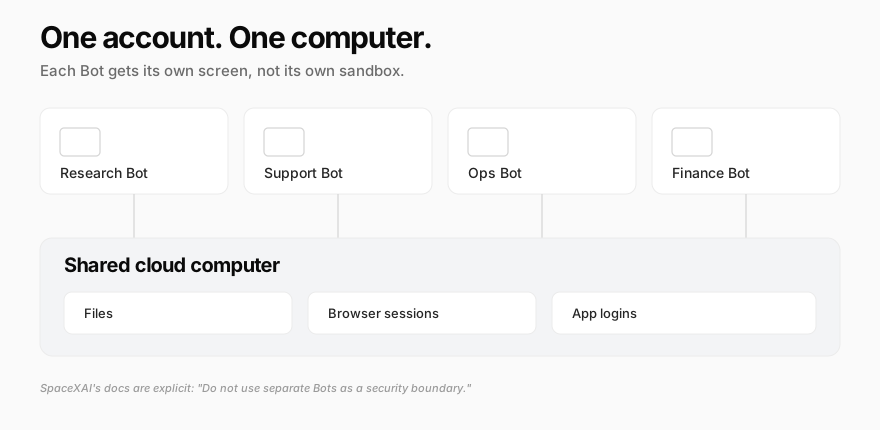
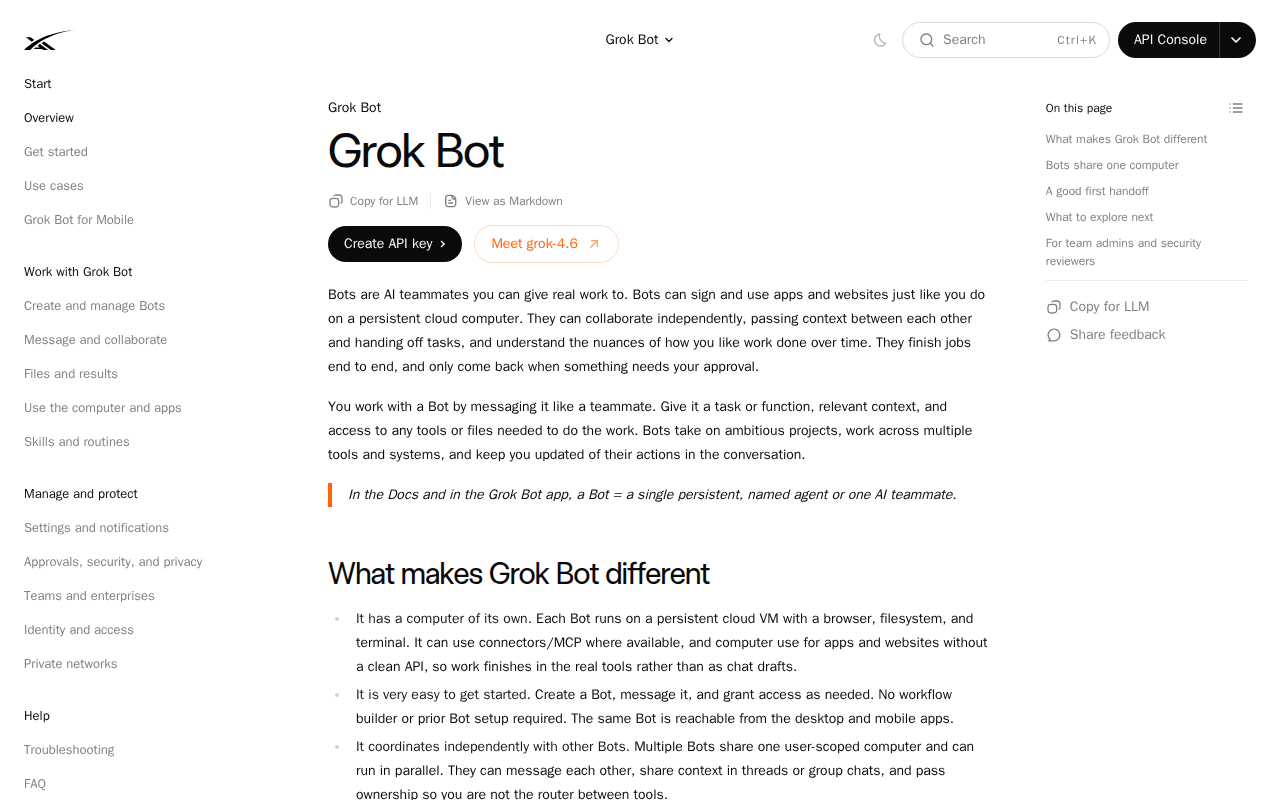
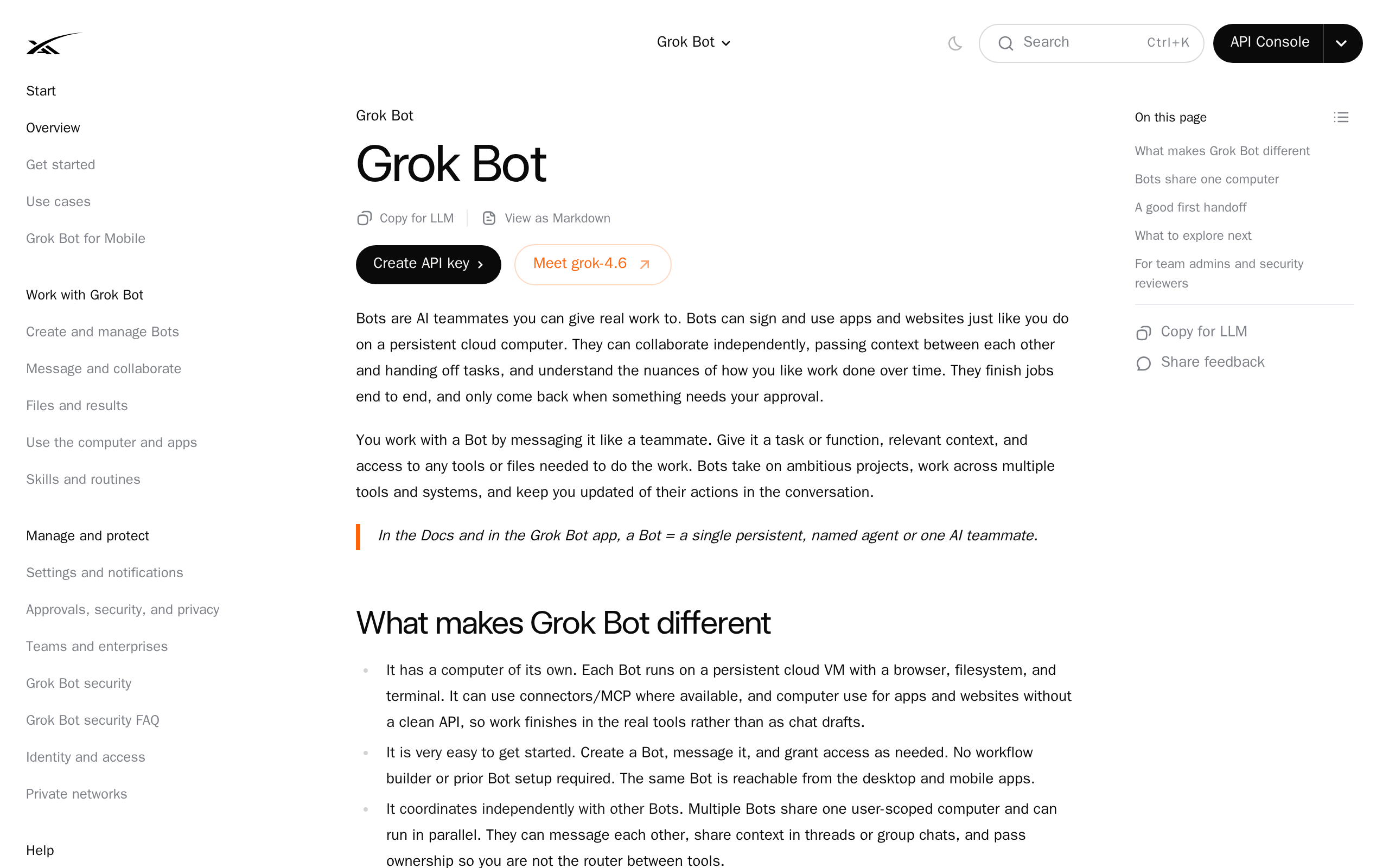 Most people assume a named Bot is a container. It is not. According to SpaceXAI's overview docs, "Every Bot on your account uses one persistent cloud computer," and that computer is "isolated to your account, not to an individual Bot." Each Bot gets its own screen on that machine, which is what lets several Bots use the browser in parallel, and only one computer-use task can run per screen at a time.
So a Bot is a role, a memory, and a screen. It is not a sandbox. Every rule below follows from that.
1. Decide What Lives on the Computer Before You Create Bots
Because logins and files are shared account-wide, the question "which Bot should have access to this?" has no answer. The real question is "should this be on the machine at all?"
Work through this before you connect anything:
- Owner accounts, yes. Your own tools, your own data, your own credentials
- Client or customer credentials, no. You cannot scope them to one Bot, so you are granting them to all of them
- Shared team passwords, no. Use per-service connectors where they exist instead of a browser session someone else depends on
- Anything under an NDA that names a third party, think hard. A Bot browsing the open web can be targeted by a malicious page trying to talk it into doing something with what it can reach
That last risk is not hypothetical, and SpaceXAI flags it directly: Bots stay logged into what you give them, and a hostile webpage may try to exploit that. Limit the blast radius at the account level, since you cannot do it at the Bot level.
2. Write the Description Like a Job Spec, Not a Personality
The description is the one per-Bot setting that gets read on every single run. It is where standing behaviour belongs. Vague descriptions ("helpful marketing assistant") produce vague work.
A description that earns its place covers:
- The job. One outcome, stated plainly
- The sources of truth. Which system wins when two disagree
- The output format. Exact structure, not "a nice summary"
- The approval line. What it may never do without you
- The escalation rule. What to do when it is blocked or uncertain
Keep changing facts out of it. Prices, headcount, and quarterly targets belong in the source system the Bot reads, not baked into a description that quietly goes stale.
3. Put Approval Rules in the Description, Not the Chat
This is the rule people learn the expensive way. Telling a Bot "check with me before you send anything" in a conversation governs that conversation. It is not a standing policy, and a routine firing at 6am has never seen it.
Grok Bot decides when to pause based on the tool, the risk of the action, and your Auto-review rules. Some steps are always yours: passwords, two-factor codes, and CAPTCHAs trigger a computer takeover so you complete them by hand.
Write the rest down explicitly. The two categories worth naming every time are sends (anything that leaves your account: email, posts, messages, PRs) and spend (anything that moves money or commits you to a bill).
4. Split Bots Only When Their Rules Conflict
The instinct is to create a Bot per project. Resist it. Since the computer, the files, and the logins are shared, extra Bots buy you no isolation and no extra capacity for computer use beyond parallel screens.
Create a second Bot when its standing instructions would contradict the first one's. A Bot that must never post publicly and a Bot whose whole job is posting publicly genuinely need separate descriptions. Two Bots doing similar work with the same rules should be one Bot with two routines.
This is the same trade-off behind the wider argument for a team of AI employees versus one generalist, where the deciding question is whether the work splits into independent paths at all.
5. Always Test Run a Routine, and Know What That Means
Before you enable a routine, use Test run. And read the warning carefully, because it is easy to skim: a test run "performs real work. It can navigate websites, change files, and call connected tools."
That is not a dry run. It is the real thing, once, on demand. Which makes it useful and also makes it dangerous:
- Point the first test at a scratch document, a test channel, or a draft, not the live artifact
- Test the failure path too. Give it a day with no data and see whether it reports nothing or invents something
- Confirm the output format matches what you asked for before you let it run unattended fifty more times
6. Build Routines on Triggers That Exist
Routines run on a schedule or, where supported, after an event. Documented event triggers work through Cursor integrations such as a new Slack message or a GitHub notification.
There is no email trigger. This matters because "watch my inbox and act on it" is one of the most commonly imagined agent workflows, and it is not currently a routine you can build. If your process starts with an email, you need to get that signal into a system that does trigger, or run on a schedule and have the Bot check.
Design the workflow around the triggers that ship today, not the ones you assume exist.
7. Respect the Ceilings: 50 Routines, 20 Run Records
A Bot can own up to 50 routines, and the app keeps the 20 most recent run records for each. Both numbers have practical consequences.
Fifty is generous, so hitting it usually means you have built many near-identical routines that should be one parameterised routine instead. Twenty retained runs is the tighter constraint: that is your entire audit trail. A routine running hourly overwrites its history in under a day. If you need to prove what an agent did last week, have the routine write its own log to a file or a document as part of the work, because the platform will not keep it for you.
8. Teach Browser Work by Demonstration, Under Ten Minutes
For anything that lives in a browser UI, demonstrating beats describing. You perform the workflow once and the Bot persists the path as a reusable skill. Teaching records visible computer interaction for up to ten minutes, and the feature has been on a gradual rollout, so it may not be live on your account yet.
Ten minutes is a real design constraint. Record one clean segment of a process rather than an entire end-to-end job, and chain short skills together. A rushed twenty-minute workflow crammed into one recording produces a skill that fails halfway.
Whichever method you use, a good skill still specifies when to use it, what access it needs, how to validate the result, what to return, and what requires approval. If you would rather write one by hand, here is how AI agent skills work and how to write one.
9. Budget the Meter, Not the Subscription
Grok Bot access is no longer the luxury purchase it was at launch. It is now included with eight subscriptions, as tracked here: Cursor Pro at $20/month, SuperGrok at $30, Cursor Teams Standard at $40 a seat, Cursor Pro+ at $60, SuperGrok Plus at $100, Cursor Teams Premium at about $120 a seat, Cursor Ultra at $200, and SuperGrok Heavy at roughly $300. Cursor Pro gained access on August 26, 2026, which cut the entry price by more than an order of magnitude.
The subscription is not the number to watch. Each plan carries a weekly usage allowance, and when it runs out, extra usage continues on your account's on-demand spend, billed from model and token cost. As of now there is no Grok Bot specific spend cap, only account-level on-demand controls.
Practical version: one badly scoped overnight routine can cost more than the plan. Set your on-demand controls before you enable your first schedule, not after your first surprise.
10. Know Which Jobs Are Not Generalist Jobs
This is the rule that saves the most money, and it is not really about Grok Bot.
A generalist agent is a capable colleague with no job description. It is superb when you already know what needs doing and you mainly need hands. The cost is that you supply the context every single time: what your product is, what it costs, who your customers are, what "done" looks like.
If you find yourself writing the same 400-word briefing every morning to explain your own business to your Bot, that is a signal. You did not want a generalist. You wanted something that already knew.
We went deeper on that split in our guide to Grok Bot alternatives, and on the broader question of what AI can genuinely run today. If you are still deciding which jobs to hand it at all, we broke down which Grok Bot use cases actually work and which ones the architecture rules out.
Where Crevio Fits, and Where It Does Not
Being straight about this: Crevio is not a Grok Bot replacement. It can work in a connected inbox and research the web, but it is built to run a business you sell through, not to book travel or run personal errands. If those are your jobs, keep the Bot and use the nine rules above.
Crevio is an AI business builder. It applies to exactly one slice of rule 10: the case where the outcome you want is a running business rather than a completed task. You describe what you want to sell, and the AI builds it, launches it, and works on growing it. The relevant difference is context. Products, Stripe-powered checkout, subscriptions, customer records, and analytics are real features rather than things an agent reassembles from your prompt each morning.
Where it genuinely loses: no general purpose task execution, and no physical products, inventory, or shipping. It is not a Shopify replacement. Transaction fees apply on every plan (5% on Starter, 2.5% on Pro, 1% on Business), so there is no 0% tier.
Crevio's Starter plan is free with 20 AI credits a month and 2 published products. Pro is $20/month with 1,000 credits and unlimited products. Business is $50/month with 2,500 credits, a custom domain, and unlimited seats.
Nobody's agents are fully autonomous today, ours included. What you get is a partner that automates real work and takes on more of it over time.
What Nobody Tells You Until Month Two
- Your audit trail is 20 runs deep. Everyone discovers this the first time they need to explain what an agent did, and by then the record is gone. Log to a file from day one.
- Shared browser sessions cause the weirdest bugs. Two Bots working in the same logged-in account will step on each other's state in ways that look like model failure and are not.
- The description drifts from reality faster than you expect. Anything you hardcoded is now wrong. Re-read every description monthly.
- Approval fatigue is real, and it is the trap. After the fortieth routine approval you start clicking through without reading, which is functionally the same as having no approval rule. Approve categories of action, not every action.
- Most of what you want automated is not agent work. Write down the ten tasks you want handled this month and count the genuinely open-ended ones. It is usually two or three. The rest is cheaper, more reliable, and more debuggable as a plain workflow.
Grok Bot Best Practices FAQ
Can I give one Grok Bot access to something and not the others?
No. The computer is assigned per user account, and all Bots share its files, browser sessions, and logins. SpaceXAI's docs state directly that separate Bots should not be used as a security boundary. Your access decisions have to be made at the account level, by choosing what goes on the machine at all.
Does Grok Bot run on Windows and Linux?
Yes. SpaceXAI's FAQ lists desktop builds for macOS (Apple silicon and Intel), Windows (x64 and Arm64), and Linux (x64 and Arm64 as .deb, .rpm, and AppImage), plus iOS 18+ and Android 9+. iPad is not supported. This changed after the August 2026 launch, when the download was macOS and iOS only.
What is the cheapest way to get Grok Bot?
Cursor Pro at $20/month is the lowest tier that includes it, added on August 26, 2026. Note that cheaper plans carry smaller weekly usage allowances, so the entry price buys access rather than volume. Confirm current terms on SpaceXAI's own pricing page before subscribing, since tier eligibility has shifted several times already.
Can a routine trigger from an email?
Not currently. Routines run on a schedule or on supported event triggers through Cursor integrations, such as a Slack message or a GitHub notification. If your workflow begins with an email, route that signal into a system that does support triggers, or run the routine on a schedule and have the Bot check.
How many Bots should I actually create?
Fewer than you think. Start with one and add a second only when its standing rules would contradict the first one's. Since tools, files, and logins are shared account-wide, extra Bots add management overhead without adding isolation.
The rules that matter are not the ones you put in a prompt. They are the ones you decide before the first Bot ever runs.
Related Blog Posts
- 7 Best Grok Bot Alternatives in 2026 (Free & Self-Hosted)
- Can AI Run a Business? What's Actually Possible in 2026
- What Is an Autonomous AI Company? The 2026 Definition, Levels, and How to Build One
- AI Executive Assistant: The 2026 Guide for Founders and Solopreneurs
- 7 Best OpenClaw Alternatives in 2026 (Compared & Reviewed)
What will you sell today?
Describe what you want to sell — Crevio builds, launches, and grows it. Products, payments, and marketing, all on autopilot.
Start for free