Your business,
on autopilot.
One platform for creating, running and growing your business, powered by AI.
AI Agent Backup Models: How to Keep Your Agent Running When a Model Fails




Last updated: September 2026. Status pages, incident reports and docs checked on September 28, 2026.
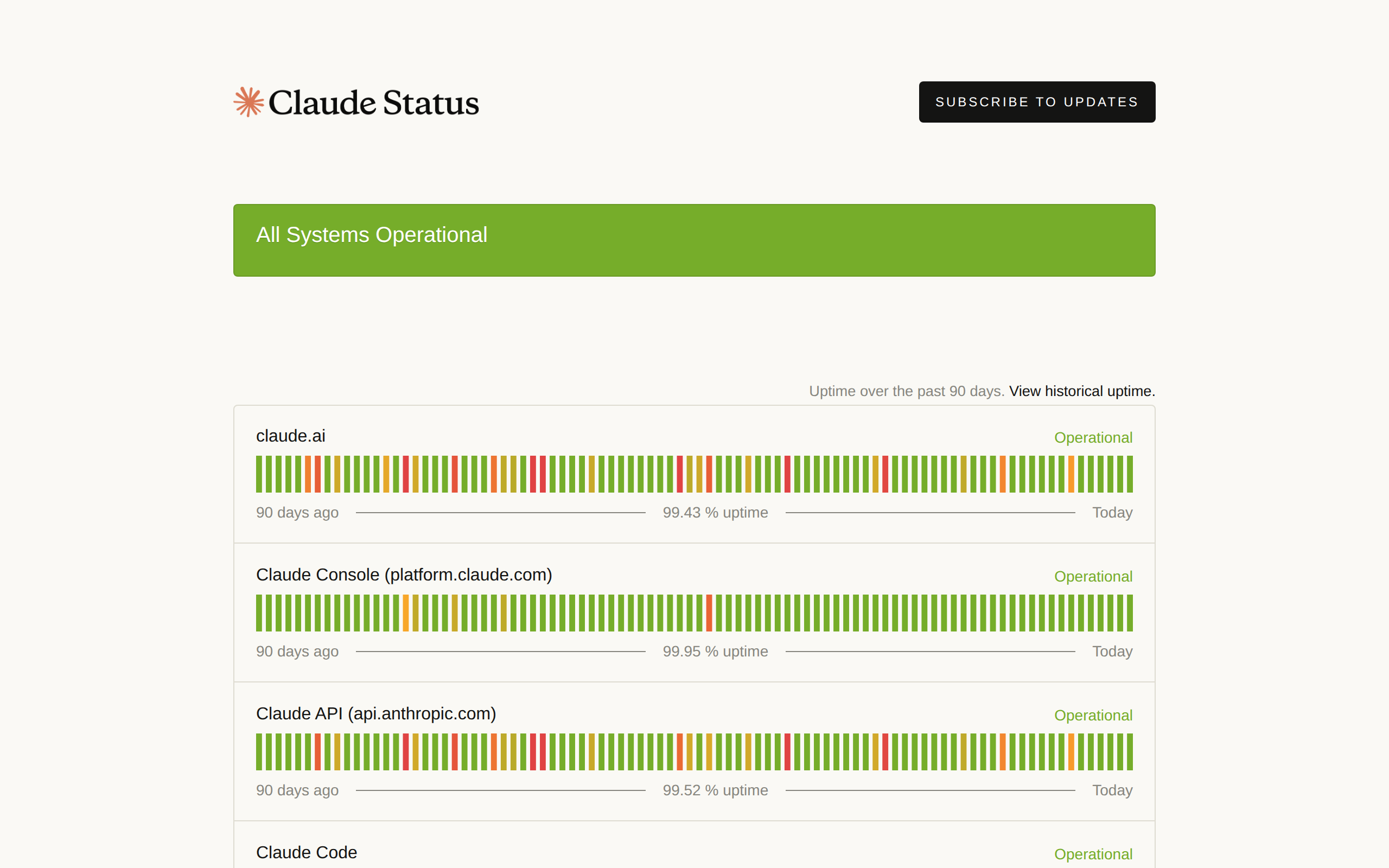
Your agent's model will fail, and the backup model you set up to catch it will not behave like the model you tested with. On September 28, 2026, the Claude API status page showed 99.52% uptime over the previous 90 days. That sounds close to perfect until you do the arithmetic: 0.48% of 90 days is the equivalent of roughly 10 hours of degraded or unavailable service in one quarter. An AI agent backup model is how your agent keeps working through those hours. Set up carelessly, it is also how a task quietly half-finishes on a model nobody ever tried.
This guide is for business owners and operators who run agents on a schedule or in front of customers. It covers what breaks, which errors should trigger a switch, how the main routing tools handle it, and how to prove your fallback works before you need it.
- Three different failures look alike from the outside: outages, rate limits, and retired models. Only some of them call for a backup model
- Retry first, switch second. Many failures clear on a short retry or on another host running the same model
- A backup model is not a drop-in copy. Newer models reject parameters older ones accepted, tool calling differs, and the warm prompt cache is gone
- Fallbacks cost more per step than you expect, because the backup starts with a cold cache
- An untested fallback is a guess. Force a failure on purpose, run real tasks on the backup, and log which model answered
What an AI Agent Backup Model Is
An AI agent backup model, often called an LLM fallback, is a second model set up in advance to take over when the agent's main model cannot answer. The switch is usually automatic: a router or gateway sees the error, sends the same request to the next model on a list, and hands the answer back as if nothing happened.
It is one of four layers of protection, and it should be the third one you reach for, not the first:
| Layer | What it does | Fixes | Changes the model? |
|---|---|---|---|
| Retry | Sends the same request again after a short wait | Brief spikes, one-off timeouts | No |
| Host failover | Sends the request to another provider running the same model | One data center or host failing | No |
| Model fallback | Sends the request to a different model | Full outages, exhausted quotas | Yes |
| Planned migration | Moves the agent to a new model on purpose | Retirements and deprecations | Yes, permanently |
The order matters because each step down the table changes more about how your agent behaves. A retry changes nothing. A different model changes almost everything, as later sections show.
Three Ways Your Primary Model Fails
Outages
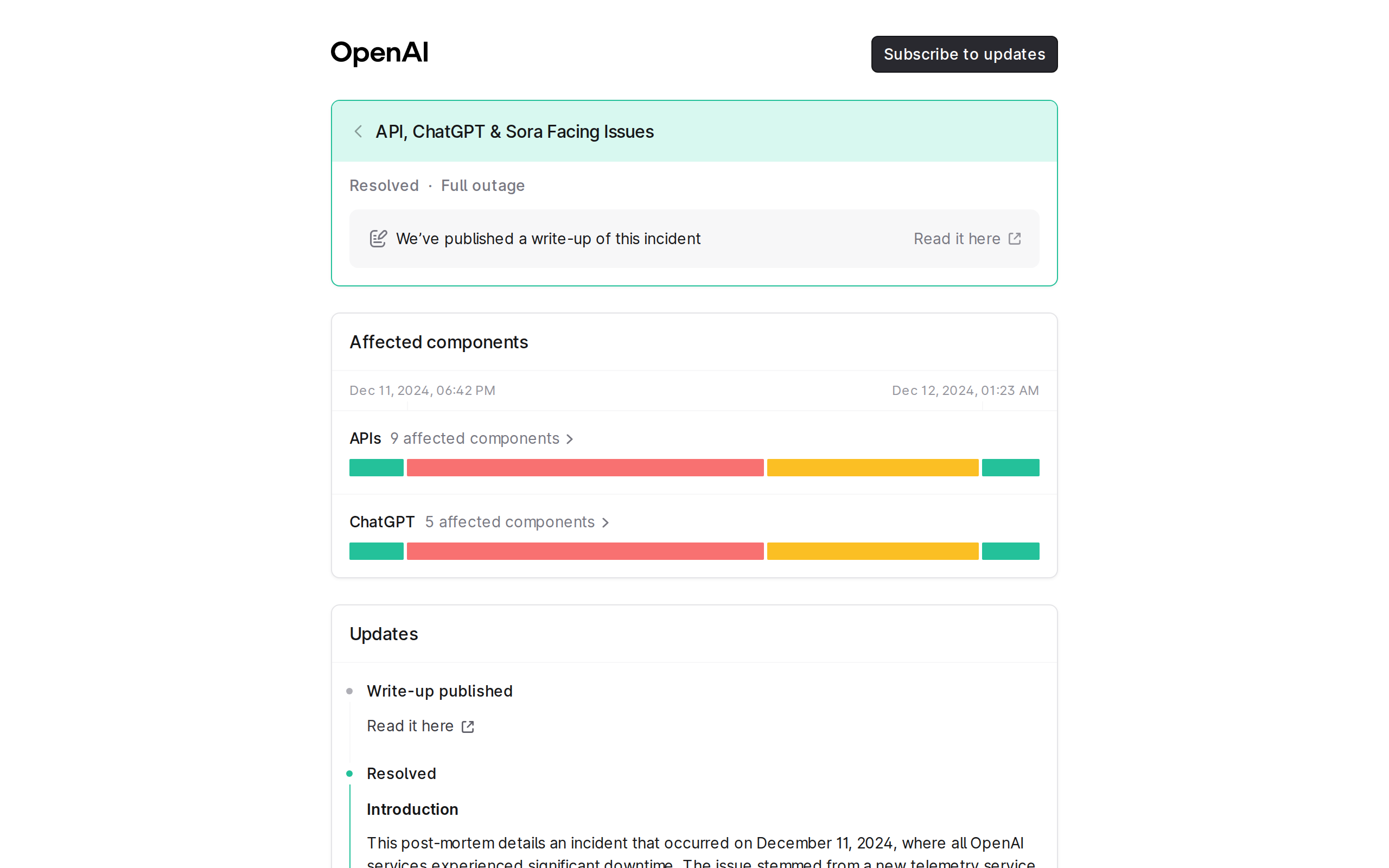
Every major provider has had them, and the incident reports are public. On December 11, 2024, every OpenAI service was significantly degraded or down from 3:16 PM to 7:38 PM Pacific: 4 hours and 22 minutes across ChatGPT, the API and Sora. The cause was a new telemetry service that overwhelmed OpenAI's Kubernetes control plane. The bug only showed up in large clusters, so testing missed it.
Shorter incidents are far more common. On March 4, 2026, OpenAI reported 30 minutes of elevated API errors after a batch of delayed capacity changes executed at once and pulled inference engines out of service. Anthropic's status page shows the same pattern: long stretches of green with a steady scatter of short red and amber days.
A 30-minute outage barely registers when you are chatting. It matters a lot when a scheduled task fires in that window, because nobody is there to press retry.
Rate limits and 429 errors
A 429 error means the provider is up but will not serve you right now. Most of the time it is a per-minute limit: Anthropic's API uses a token bucket that refills continuously and sends a retry-after header telling you how many seconds to wait. Waiting that long and retrying the same model is the right move.
Not every 429 is temporary, though. When an Anthropic organization reaches its monthly spend cap, the API returns a 429 with no retry-after header, and the docs are blunt about it: "Retrying, including the SDKs' automatic retries, fails until access resumes." Access comes back at the start of the next month. An agent that treats every 429 as "wait and retry" will retry all night against a limit that may not reset for weeks.
Deprecations and retirements
Models get retired on a schedule, and a retired model does not degrade gracefully. Anthropic's deprecation policy promises at least 60 days' notice for publicly released models, and states that "requests to models past the retirement date will fail." Claude Opus 4.1 is a recent example: developers were notified on June 5, 2026, and the model was retired on August 5, 2026.
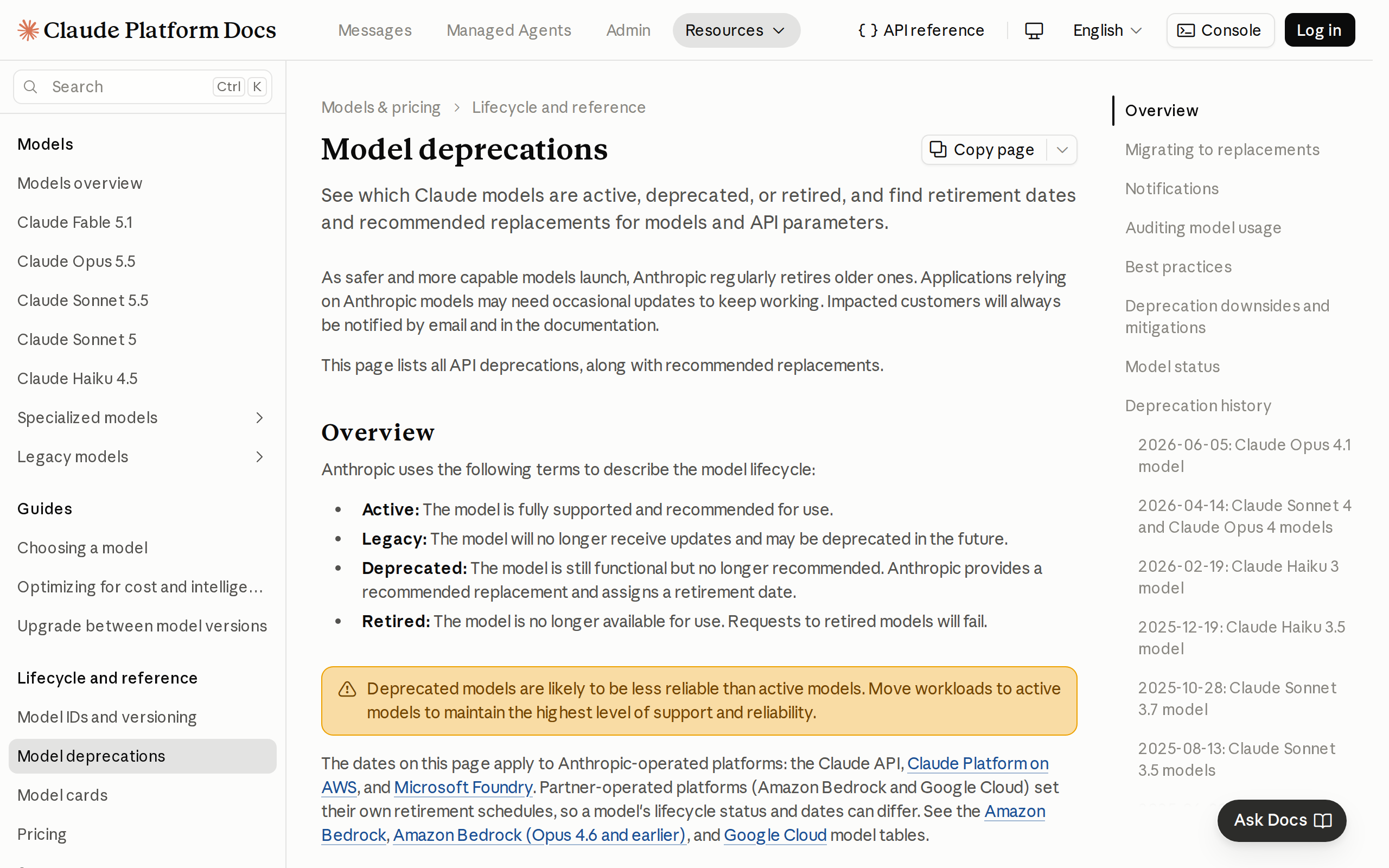
OpenAI's deprecations page gives generally available models at least six months' notice, but preview models "may be retired with much shorter notice, such as 2 weeks." In June 2026 it announced that the GPT-5 and o3 snapshots shut down on December 11, 2026. A backup model does not solve a retirement. It only hides it until the backup's own retirement date arrives.
The failure no fallback catches
The most expensive failure never throws an error. In 2025, Anthropic published a postmortem of three infrastructure bugs that degraded Claude's answers for weeks. At the worst hour, 16% of Sonnet 4 requests were affected by one of them. Part of why it took so long to find: "Claude often recovers well from isolated mistakes," which masked the problem.
No fallback chain fires on a worse answer, because a worse answer still returns a 200. That is a job for spot checks on what the agent produces, not for routing.
Which Failures Should Switch to an AI Agent Backup Model
Read the error before you react to it. The same "the model failed" can mean wait five seconds, switch now, or fix your own request.
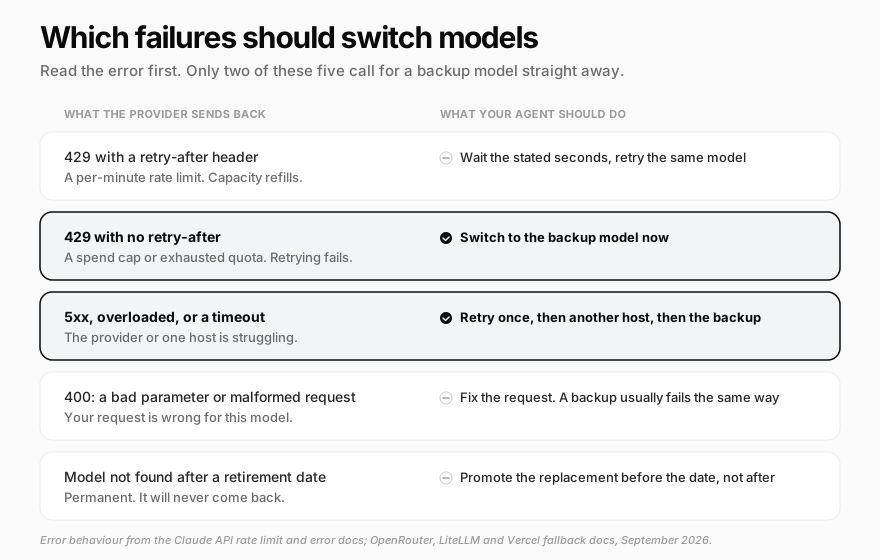
Two rows deserve a closer look:
- 5xx, overloaded and timeout errors. Anthropic's error reference lists a 529
overloaded_errorfor high traffic across all users, and its SDKs already retry transient failures twice with exponential backoff. One more retry is fine. Five is how a 30-second blip becomes a 10-minute stall - 400 errors. A bad parameter or malformed request fails on the backup too, often for the same reason. The exception is a prompt that is too long: some routers send it to a model with a bigger context window instead, which is a fallback that helps
How Fallback Chains and Routing Work
You rarely build fallback logic yourself. A routing layer between your agent and the providers does it, and four are common:
| Tool | How you set the backup | What triggers it | How you see which model answered |
|---|---|---|---|
| OpenRouter | A models array in priority order |
Downtime, rate limits, context length errors, moderation flags | The model field in the response |
| LiteLLM | fallbacks, plus separate context window and content policy fallbacks |
Rate limits and server errors, with cooldowns after repeated failures | Proxy logs and callbacks |
| Vercel AI Gateway | A models array, combined with a provider order |
Any failure of every provider for a model | A modelAttempts list in the provider metadata |
| Cloudflare AI Gateway | A list of steps on the Universal endpoint | Errors and request timeouts | The cf-aig-step response header |
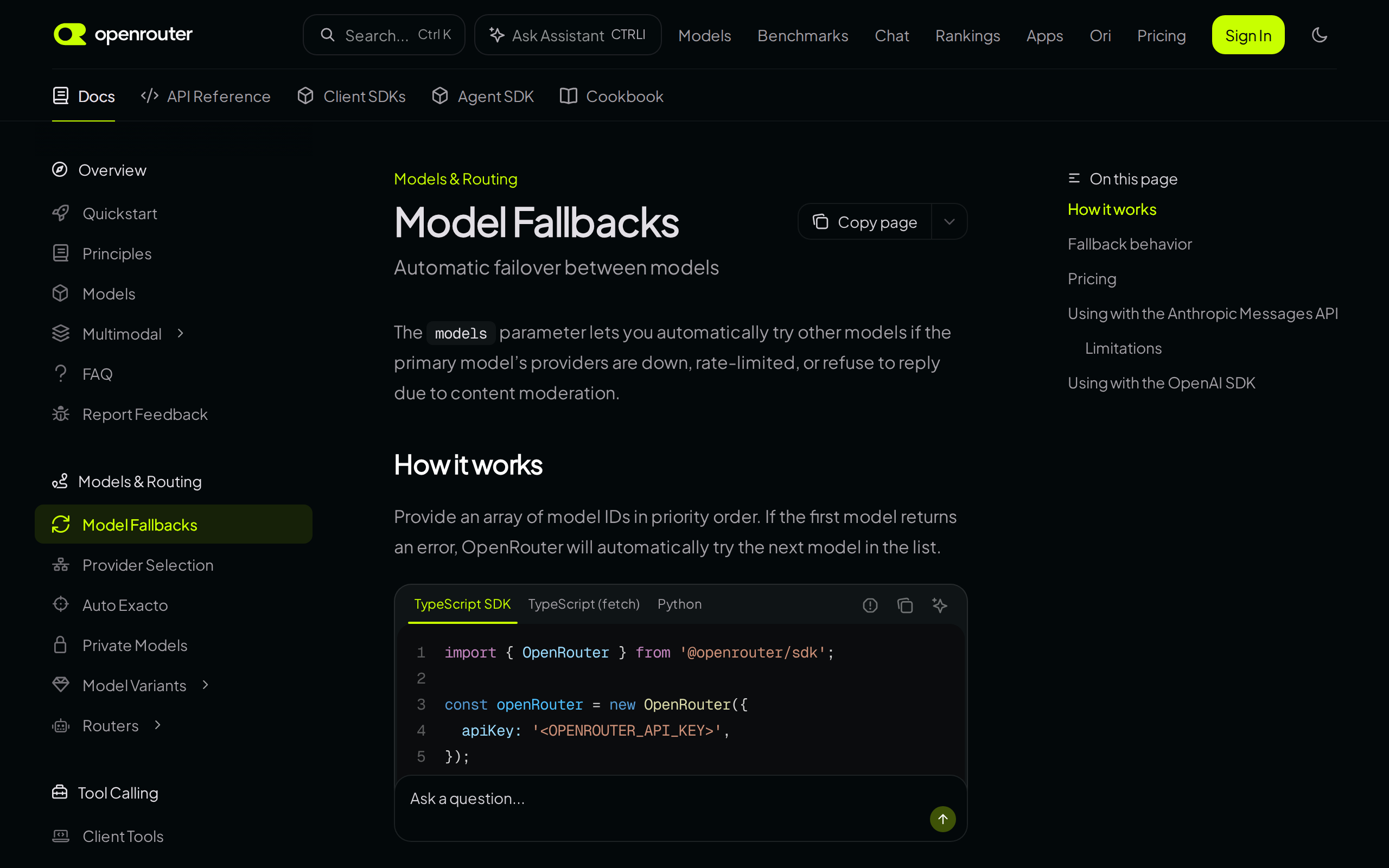
OpenRouter's model fallbacks are the simplest to picture: you pass a list of model IDs, and "if the first model returns an error, OpenRouter will automatically try the next model in the list." Requests are billed at the price of the model that finally answered. Separately, its provider routing handles host failover for the same model. By default it prefers providers that "have not seen significant outages in the last 30 seconds," and allow_fallbacks stays on unless you turn it off.
LiteLLM's reliability settings split the problem more finely. Ordinary fallbacks cover rate limits and server errors, context_window_fallbacks route an oversized prompt to a larger model, and content_policy_fallbacks catch content policy errors. allowed_fails and cooldown_time take a failing model out of rotation for a while, so a struggling provider is not hammered on every request.
Vercel AI Gateway's model fallbacks combine both layers: it tries every allowed provider for the primary model, then moves to the next model in the models array, and records each attempt. Cloudflare AI Gateway's fallbacks work on its Universal endpoint and tell you where the answer came from in a header: cf-aig-step: 0 means the primary answered, 1 means the first fallback did.
One caution applies to all four. The gateway is also a dependency. Cloudflare's own network had a major outage on November 18, 2025, from 11:20 to 17:06 UTC, after a bad configuration file spread across it. A fallback chain protects you from a model provider failing. It cannot protect you from the layer that runs the chain.
Why an AI Agent Backup Model Behaves Differently
A fallback that returns an answer has not necessarily done the job. Agents are more fragile here than chatbots, because an agent is in the middle of a multi-step task when the switch happens, carrying a long history of tool calls the new model has to pick up.
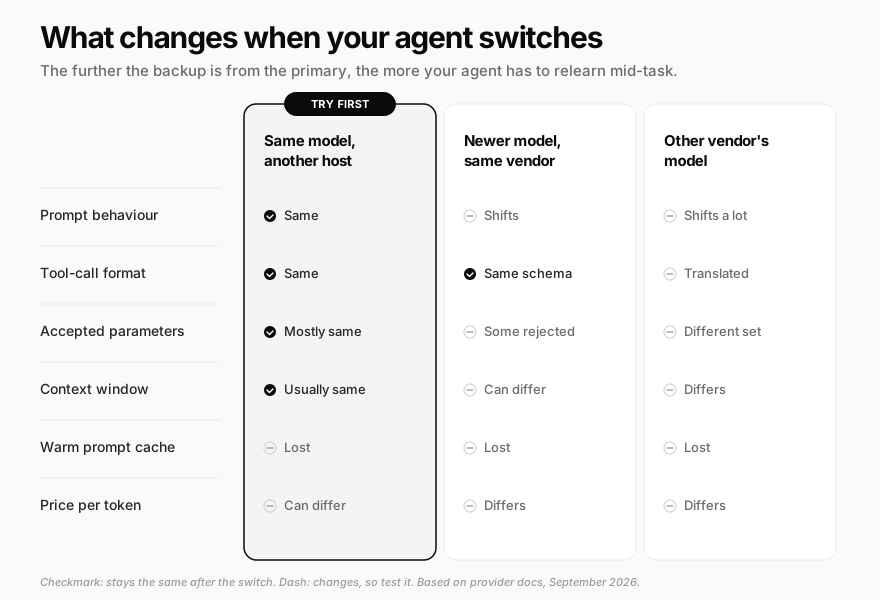
Parameters that one model accepts and another rejects
This bites even within one vendor. Per Anthropic's deprecation notes and error reference:
- Setting
temperature,top_portop_kto a non-default value returns a 400 on Claude Opus 4.7 and later - Forcing a specific tool with
tool_choicereturns a 400 on Claude Opus 5.5, Sonnet 5.5 and Fable 5.1 - Prefilling the start of the assistant's reply returns a 400 on Claude 4.6 and later models
So a chain that falls back from an older model to a newer "better" one can fail instantly with an error the primary never produced. OpenRouter's require_parameters option exists partly for this: it only routes to providers that support every parameter you sent.
Tool calls and prompts
Different vendors expect tools, results and reasoning in different shapes, so a cross-vendor fallback depends on the gateway translating the conversation correctly. Even when the format survives, the backup was not the model you tuned your instructions on. It may call tools in a different order, stop earlier, or read "be brief" as "skip the check." Some reasoning data does not carry over at all: Anthropic notes that a thinking block "from a model the target model can't read is dropped."
Context windows
If the backup reads less than the primary, a long agent run can be too big for it the moment it takes over. That is why OpenRouter lists context length errors as a fallback trigger and LiteLLM gives them their own fallback list. Put a backup with at least the primary's context window in the chain, or have the agent condense older history before switching.
What Fallbacks Cost
A backup model changes the bill in three ways, and none of them show up in a price comparison table.
The warm cache is gone. Prompt caching is a big part of what keeps agents affordable: the instructions, tool definitions and history are re-sent on every step and mostly billed at the cached rate. Caches live with a specific model on a specific provider, which is why OpenRouter uses sticky routing "to route your subsequent requests to the same provider endpoint after a cached request." Switch, and the next step pays full price. At the Claude Sonnet 5.5 list price of $2.00 per million input tokens and $0.20 cached, a 50,000-token agent history costs about $0.01 to re-send from cache and about $0.10 without it. Ten times more per step until the backup's own cache warms up.
You pay for what answered, in its own tokens. OpenRouter bills the model that finally responded, so a fallback to a pricier model costs more, and a cheaper backup that needs extra steps to finish can cost more too. Token counts are not portable either: Anthropic's pricing page notes that its Claude 4.7 and later models use a newer tokenizer that produces approximately 30% more tokens for the same text.
Retries bill as well. A request that fails halfway through a stream has often already produced paid tokens, and every retry re-sends the whole context. We covered how this adds up in AI agent running costs: failed runs and loops are a tail that can exceed the average.
None of this argues against backups. It argues for keeping them as backups, with retries and host failover absorbing the everyday errors so the expensive switch only happens in real outages.
Test Your Fallback Before You Need It
Most fallback chains are first exercised during an incident, which is the worst time to learn the backup cannot call your tools. A short drill once a quarter, and after every model change, catches most of it:
- Force the failure. Point the primary at a model ID that does not exist, or use your router's test switch. LiteLLM offers
mock_testing_fallbacks=Truein its SDK, and recommends triggering a real provider error in a non-production environment for its proxy - Run real tasks, not a hello-world prompt. Take three or four of your agent's actual jobs, including one long, tool-heavy run, and let them finish entirely on the backup
- Compare the outputs. Did it call the same tools, stop at the same place, and follow your formatting rules? Read the transcripts, not only the final answer
- Confirm which model answered. Check the response
modelfield,modelAttempts, or thecf-aig-stepheader. A drill where the primary quietly answered proves nothing - Alert on fallbacks. A backup that fires every day is not a backup anymore. It is your real model, untested at that volume, and you want to know
- Put retirement dates in your calendar. Check the deprecation pages for both the primary and the backup, and move to the replacement well before either date
For scheduled work, pair this with a plan for the run that fails anyway. Our guide to scheduling recurring AI agent tasks covers what a good failure looks like: a partial result, a plain message, and a task that stops itself instead of retrying forever.
How Crevio's Agent Handles Model Failures
Crevio is an AI business builder: you describe what you want to sell, and its agent builds, launches and runs the work around it. Crevio chooses and runs the models behind that agent, so you do not manage provider accounts, keys or model versions. Here is what happens when a model misbehaves, described plainly, including what it does not do.
What it does today:
- Retries the same model automatically. When a model call fails with an overload, a rate limit, a server error, a timeout, or a reply that cuts off mid-stream, the agent tries again up to three times, waiting a little longer each time (up to about 2, 4 and 8 seconds). Errors that retrying cannot fix, like a malformed request, are not retried
- Avoids a host that just failed. For models that can be served from more than one host, a retry after a host error skips the one that just produced it
- Condenses long conversations. If a conversation grows past what the model can read, the agent summarizes older history and tries once more instead of stopping
- Checks the model list on every release. Each time Crevio releases an update, it confirms that every model the agent depends on is still offered, and the release is flagged as failed if one has disappeared
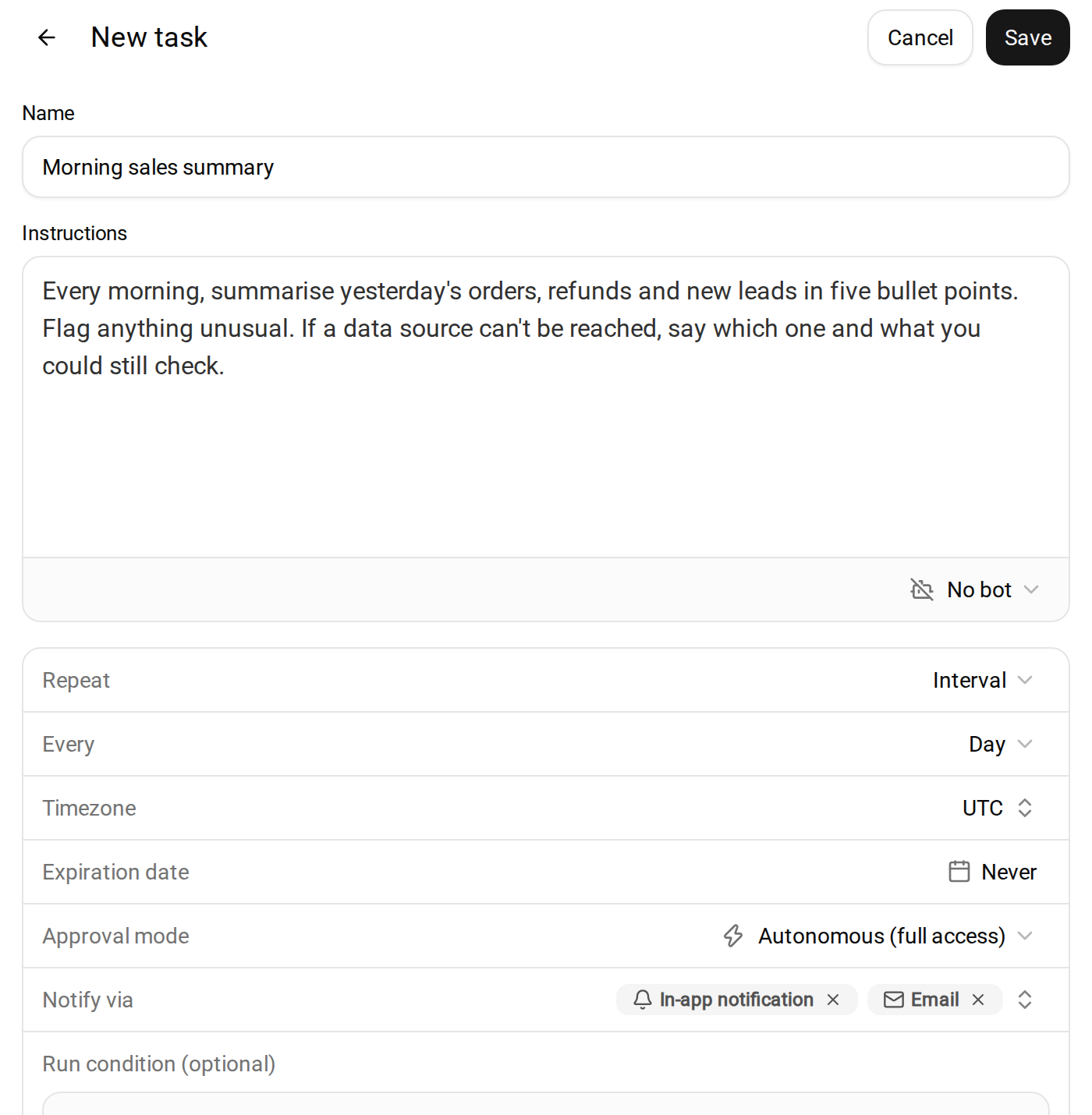
What happens when it still fails: a scheduled task run that fails is reported through the channels in its Notify via setting, with what it got done and what went wrong. A recurring task switches itself off after three failed runs in a row by default and tells you, rather than failing every morning unnoticed. In a live chat, a reply that exhausts its retries simply stops, and you send the message again.
What it does not do yet: Crevio's agent does not automatically switch to a different model mid-task when its main model is down. Today the protection is retries and host failover on the same model. You also cannot pick the agent's model or plug in your own provider key. If you need a hand-tuned fallback chain across vendors, a routing tool from the table above, in your own stack, gives you that control.
Crevio starts free, and the Starter plan includes 20 AI credits a month.
FAQ
The gateway is where you configure the backup, not a backup in itself. Some retry or fail over between hosts for the same model on their own, but a model fallback only happens if you list one. They also add a dependency of their own, so check how your gateway behaved during past incidents.
For outages, yes: a backup from the same provider often goes down in the same incident. For rate limits, a second model from the same provider can be enough, since limits are usually set per model. The trade-off is compatibility: the further the backup is from your primary, the more you have to test prompts, tool calls and parameters on it.
Run a drill after every change to the primary model, the backup, or your agent's instructions and tools, and at least once a quarter otherwise. Also check both models' deprecation dates each time, since a backup that has been retired fails exactly when you need it.
A Backup You Have Never Run Is a Guess
Outages, rate limits and retirements are routine now, and a good AI agent backup model turns them from a missed morning report into a slightly slower one. But the value is in the order you apply them: retry, then another host, then another model, and only with a backup you have already watched finish real work. If you have not tested it, you do not have a fallback. You have a second thing that can fail.
Related Blog Posts
What will you sell today?
Describe what you want to sell — Crevio builds, launches, and grows it. Products, payments, and marketing, all on autopilot.
Start for free