Your business,
on autopilot.
One platform for creating, running and growing your business, powered by AI.
Discord Rules Template: Copy-Paste Rules for Every Server Type (2026)





A Discord rules template only works if members actually read it, and Discord itself won't let you enable Community server features without "clearly posted rules and guidelines" already in place. Copy-pasting a generic list of "be nice, no spam" rules technically checks that box, but it doesn't survive contact with your first troll, your first heated debate, or your first member who claims they never saw the rule you're banning them for. This guide gives you a copy-paste core template, four server-type variations, and the setup and enforcement system that makes any of it stick.
- Start from a universal core, then layer in 3-5 rules specific to your server type instead of writing everything from scratch
- Discord's Rules Screening feature gates chat, reactions, and DMs behind an "I agree" checkbox, and it caps you at 16 custom rules, which is a useful ceiling to write against
- Vague rules create inconsistent moderation. "Don't spam" and "no more than one self-promotion post per week, in #self-promo only" produce very different mod team behavior
- A rules list needs a consequence ladder, not just a list of what's forbidden. Without one, every enforcement decision becomes a judgment call your mods will disagree on
What Makes a Discord Rules Template Actually Work
A rules template is not the same thing as a rules list. The difference is what happens six months in, when your server has grown past the size where you personally read every message.
Three things separate a template that holds up from one that gets rewritten in a panic after the first ban dispute:
- Enforceable, not just aspirational. "Be respectful" is a value. "No personal insults, no name-calling, no telling someone to kill themselves even as a joke" is a rule a moderator can act on without debating intent
- Scannable in under 30 seconds. New members skim. A wall of legal-style paragraphs gets ignored the same way cookie consent banners do
- Backed by a consequence system. A rule with no stated penalty forces every mod to invent one on the spot, and different mods inventing different penalties is how servers develop a reputation for unfair moderation
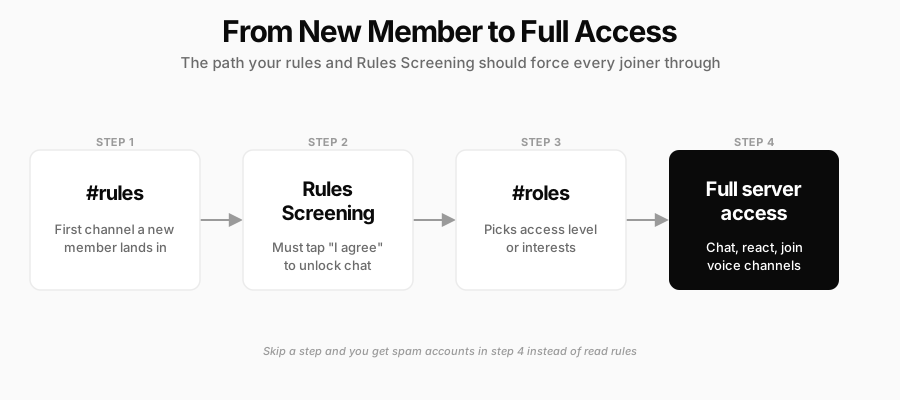
Most servers do best with somewhere between 5 and 16 rules: enough to cover the real failure modes of your specific community, few enough that someone actually reads the whole list. That upper bound isn't arbitrary. It's the same limit Discord puts on Rules Screening, the built-in feature that shows new members a full-screen "read and accept" gate before they can chat, react, or send DMs. Writing to that constraint from the start saves you from cutting a bloated 25-item list down later.
The Core Discord Rules Template (Copy This First)
These nine rules cover the vast majority of moderation situations that show up in any server, regardless of topic. Copy them as your starting point, then add the server-type rules below on top.
- Follow Discord's own Terms of Service and Community Guidelines at all times. Server rules don't override Discord's platform-wide policy.
- Treat every member with respect. No harassment, hate speech, slurs, or personal attacks, including "just joking" versions of any of the above.
- No spam, unsolicited self-promotion, or advertising outside a designated channel, and no unsolicited DMs pitching products, servers, or services to other members.
- Keep content appropriate for this server's stated audience. If the server isn't age-restricted, no NSFW text, images, or links.
- No pirated content, cracked software, malware, or phishing links. This one has zero gray area and should carry an immediate ban.
- No doxxing. Never share another member's real name, address, workplace, or other identifying information without explicit consent.
- Use channels for their stated purpose. Off-topic chatter belongs in #general or #off-topic, not in a support or announcements channel.
- Respect staff decisions in the moment. Publicly arguing with a moderator mid-action derails the channel for everyone; open a ticket or DM a mod to appeal instead.
- English (or your server's stated primary language) in text channels, unless a specific channel is designated multilingual. Skip this one if it doesn't apply to your community.
Discord Rules Templates by Server Type
The core template handles the baseline. What actually differentiates a good server's rules from a copy-pasted one is the 3-5 rules written for your specific community, because a gaming server, a paid trading community, and a course cohort fail in genuinely different ways.
Gaming Discord Servers
- Spoiler tag anything from a release in the past 2 weeks, using Discord's built-in spoiler formatting, not just a warning in the message text
- No discussion of cheats, trainers, or exploits in any channel, including "just for testing" framing
- LFG (looking for group) posts go in #lfg only, with your platform and region in the message
- Mute or push-to-talk in busy voice channels during matches; open mic background noise is a kickable offense in ranked voice channels
- No account or item trading outside a designated channel, and never for real money unless the game's own terms explicitly allow it
Paid and Membership Communities
- No screenshotting or redistributing paid content outside the server, including calls, resources, or exclusive posts
- Financial, trading, or coaching content is not personalized advice. State this explicitly if your community discusses trades, picks, or strategies, and require it in every relevant channel's pinned message
- Refund and billing questions go to #support or a ticket, not the main chat, both for the member's privacy and to keep public channels on-topic
- Debate strategy, not people. Disagreeing with someone's trade or approach is fine; framing it as an attack on them isn't
- No poaching members into a competing paid community. This is the one place "self-promotion" rules get enforced hardest, because it's a direct threat to the business the server exists to support
In a paid trading Discord, alerts and live commentary are the entire product, so the "not personalized advice" pin has to sit somewhere members can't miss it, not buried in a rules channel nobody revisits.
Retention in a paid community depends on more than the rules themselves. If members are canceling for reasons that have nothing to do with behavior, like a stale weekly recap or a failed card nobody followed up on, that's a churn problem the rules channel can't fix; our guide to reducing Discord churn covers the 11 tactics that actually move that number.
Business and Brand Communities
- Official announcements come from a staff role only, in a locked #announcements channel, so members can trust what looks official actually is
- No unsolicited pitching, recruiting, or client outreach to other members, even in DMs
- Beta features, roadmap details, or NDA'd content stay in this server. Spell out explicitly what "confidential" covers, since "don't share this" alone gets interpreted loosely
- Keep feedback constructive and specific. "This is broken" gets deprioritized behind "the export button on the reports page returns a 500 error on Safari"
- Support requests go through the designated support channel or ticket bot, not @mentions of staff in general chat
Educational and Course Communities
- No sharing graded assignment answers in study or homework-help channels; explaining a concept is encouraged, posting the solution isn't
- Keep peer feedback specific and kind. "This needs work" helps nobody; "the intro doesn't state your thesis until paragraph three" does
- Course-specific questions go in that course's channel, not general chat, so the answer is searchable for the next student with the same question
- No members selling their own courses, services, or coaching inside the server without staff approval, even if it's tangentially related to the topic
- Office hours and live sessions have their own etiquette rules (raise-hand reactions, muted by default, questions in a dedicated thread), posted separately from the main rules list so they don't bloat it
How to Set Up Rules So Members Actually Read Them
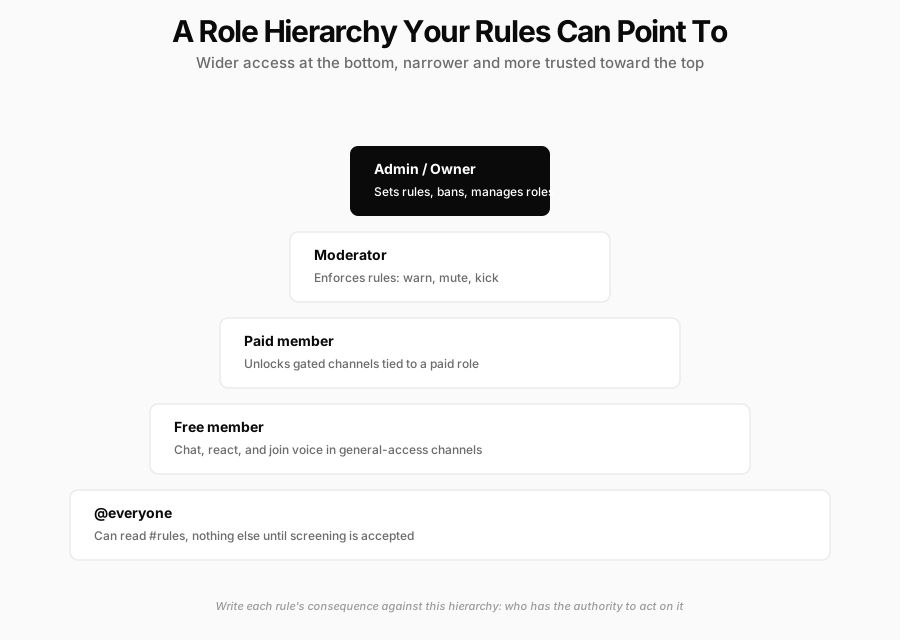
Writing the rules is half the job. The other half is making sure a new member can't avoid seeing them.
- Create a #rules channel and pin the rules at the very top of your channel list, above #general, so it's the first thing anyone sees on joining. Formatting each section with a Discord header instead of a wall of plain text is the difference between a rules channel members actually scan and one they skip past
- Turn on Rules Screening in Server Settings → Safety Setup. This gates chat, reactions, voice, and DMs behind an explicit "I have read and agree" checkbox on join, and it's the single highest-leverage setting most servers never enable. It's also why members sometimes ask why they can join a server but can't send a message right away: they haven't cleared this checkbox yet
- Pair it with a role-menu channel so accepting the rules and picking a role happen back to back, turning "I agree" into the first real action a new member takes, not a dead end before an empty server
- Set up AutoMod for the mechanical rules (banned keyword lists, mention-spam limits, known spam pattern detection) so your human moderators aren't manually catching what a filter should catch automatically
- Revisit the rules channel every time you add a feature or hit a new size threshold. A rule written for a 50-member server rarely still covers everything at 5,000 members
If you're aiming for Discord's Server Discovery listing eventually, the bar is higher than "have rules": Discord's own Discovery Guidelines require at least 1,000 members, a server age of 8 weeks or more, 10% member retention, and both 20 weekly communicators and 40 weekly visitors, on top of clean moderation history. Getting the core rules and enforcement system right early is what makes hitting those numbers possible in the first place.
Enforcement: Turning Written Rules Into Consequences
A rules list without consequences just moves the argument from "what's the rule" to "what happens now," in public, in the moment a violation happens. A written, consistent consequence ladder settles that argument before it starts.
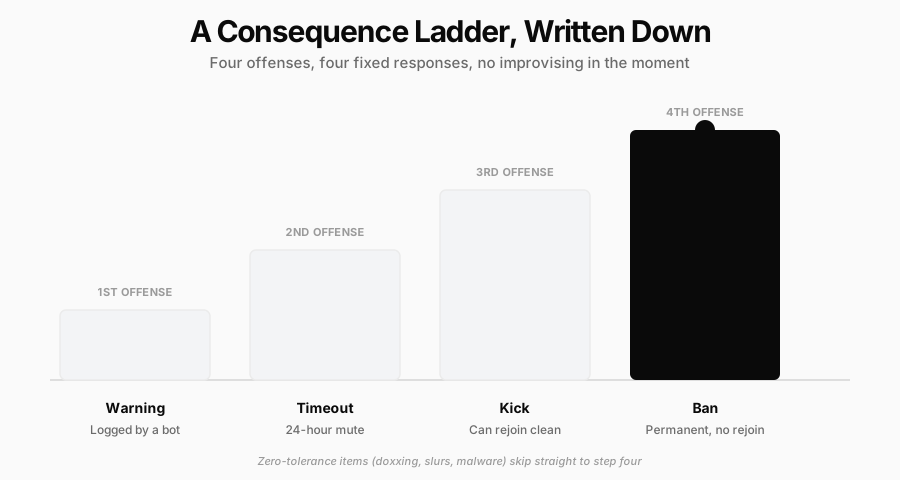
The standard version most servers converge on:
- First offense: a warning, logged by a mod bot so the history persists even if the moderator who issued it goes offline
- Second offense: a timed mute or timeout, typically 24 hours, long enough to interrupt the behavior without escalating to a full removal
- Third offense: a kick. The member can rejoin and start clean, which matters for genuine mistakes versus deliberate abuse
- Fourth offense, or anything on the zero-tolerance list (doxxing, slurs, malware links): an immediate ban, skipping straight past the earlier steps
Publish this ladder alongside the rules themselves, not as an internal mod-only document. A member who knows the exact consequence in advance is far less likely to test the boundary, and a member who gets banned can't credibly claim they didn't know what was coming.
Common Mistakes When Writing Discord Rules
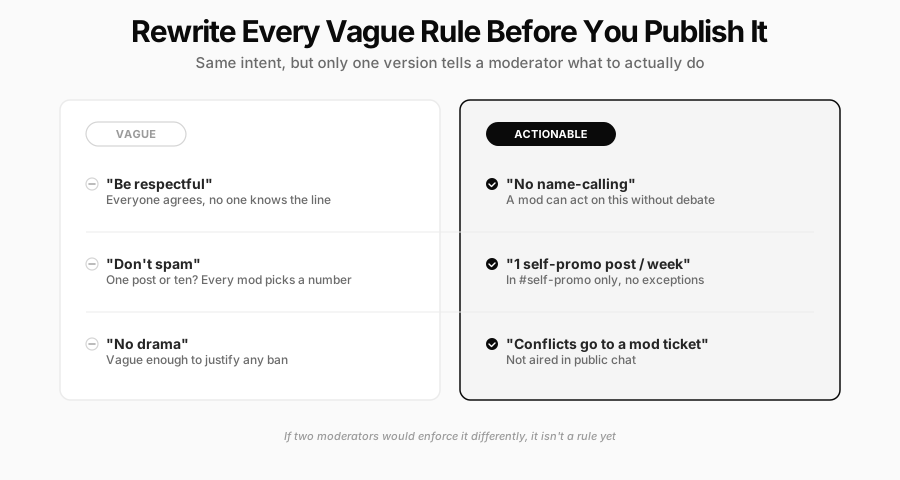
- Writing values instead of rules. "Be kind," "no drama," and "respect the community" all sound right and enforce nothing. Rewrite each one as a specific, bannable action.
- No stated consequences. Every rule should imply, or explicitly state, what happens when it's broken.
- Burying the rules in a wall of text or a pinned message three scrolls down. If new members have to search for the rules, most of them won't.
- Writing more than 16 rules. Past Discord's own Rules Screening cap, you're either duplicating rules or covering something so niche it belongs in a channel-specific pinned note instead of the main list.
- Applying rules inconsistently across moderators. This does more damage to trust in your server than almost any single rule violation, because it turns every ban into a fairness debate instead of a settled fact.
- Never revisiting the list. The rules that made sense at 50 members rarely still cover everything at 5,000; treat the rules channel as a living document, not a one-time setup task.
What Nobody Tells You About Discord Rules
- Rules Screening filters bots, not trolls. It stops drive-by spam accounts that never intend to read anything, but a determined human bad actor clicks "I agree" exactly as fast as your best member does. The gate buys you a documented record, not better behavior.
- The rule that generates the most appeals is never your strictest one. Nobody argues with "no doxxing." They argue with whatever rule was written vaguely enough to leave room for interpretation, which is the strongest case for rewriting every "be nice" into something a member can actually violate on paper.
- Discord's audit log records the action, not the reasoning, unless a moderator types a reason in manually at the time. Three months later, when a banned member asks to appeal, "why" is the question your own tools can't answer for you if nobody wrote it down.
Running a Paid Discord Community? Rules Are Only Half the System
Rules and moderation keep a Discord server's conversation healthy. They don't touch the other half of running a paid community: the storefront, the checkout, the customer records, and the billing that determines whether members actually renew.
Crevio is built for that other half. It's an AI business builder, not a chat platform, so it doesn't replace Discord and isn't trying to: your server stays exactly what it is, a place for members to talk. What Crevio handles is everything around the conversation. You describe the membership or product you're selling, and Crevio's AI sets up a storefront, Stripe-powered checkout, and a real customer list you can see and export, rather than relying on whatever a paywall bot in Discord can piece together.
That matters because most paid-community problems that look like moderation problems are actually billing problems wearing a disguise: a member who "quietly disappeared" often just had a card decline nobody followed up on. Crevio's Business plan ($50/month, 1% transaction fee) includes automatic payment retries and annual billing options that reduce that kind of silent, avoidable churn; the free Starter plan (5% transaction fee) is enough to test the setup before committing to a paid tier. If you're weighing Crevio against a Discord-native paywall tool like Whop, our honest comparison of Whop alternatives breaks down where each approach fits.
FAQ
Somewhere between 5 and 16. Discord's own Rules Screening feature caps custom rules at 16, and that ceiling is a reasonable target even if you're not using the feature: enough to cover your community's real failure modes, few enough that a new member actually reads the whole list before agreeing to it.
You don't need it to have valid rules, but it's the single highest-leverage setting most servers skip. It gates chat, reactions, and DMs behind an explicit "I agree" checkbox, which stops drive-by spam accounts that never intend to read anything, and gives you a documented record that a banned member did in fact see and accept the rules before breaking them.
Copy the nine core rules as-is; they apply to essentially any server. The server-type sections above are a starting point, not a finished list: the specific channels, tone, and edge cases that come up in your actual community over the first month should get folded back into the rules as you see them happen, rather than trying to anticipate every scenario on day one.
A rules template only becomes a working system once it's paired with a way for new members to actually see it and a ladder that makes enforcement predictable. Get those two pieces right, and the exact wording of rule seven stops mattering nearly as much as you'd think.
Related Blog Posts
What will you sell today?
Describe what you want to sell — Crevio builds, launches, and grows it. Products, payments, and marketing, all on autopilot.
Start for free