Your business,
on autopilot.
One platform for creating, running and growing your business, powered by AI.
How to Sell Ebooks Online: A Step-by-Step Guide for 2026





The global ebook market is on pace to hit $15.65 billion in 2026, and you do not need a literary agent or a publishing deal to claim a slice of it. Anyone with real expertise, a laptop, and a PDF can write, price, and sell an ebook today, keeping most (or all) of the revenue instead of splitting it with a traditional publisher.
- Pick your format early: PDF is the most portable choice for knowledge-based ebooks; EPUB and Amazon's format matter more for long-form fiction and nonfiction sold through retailers.
- Choose the right platform for your goal: Amazon KDP wins on discovery, Gumroad, Payhip, and Sellfy win on control and margin, and a platform like Crevio makes sense if the ebook is one piece of a bigger digital product business.
- Pricing and marketing decide the outcome, not the writing: most ebooks that fail were well-written and promoted to nobody.
Quick Comparison
| Platform | Best For | Fees | Free to Start |
|---|---|---|---|
| Amazon KDP | Discoverability, browsing readers | 70% royalty between $2.99-$12.99, 35% royalty outside that range | Yes |
| Gumroad | Simple direct sales, no monthly fee | 10% + $0.50 per sale, plus card processing | Yes |
| Payhip | All-in-one direct sales with email tools | 5% free / 2% Plus ($29/mo) / 0% Pro ($99/mo) | Yes |
| Sellfy | Zero per-sale fee at volume | $0 transaction fee, $22-$159/mo subscription | 14-day trial |
| Crevio | Bundling an ebook into a full digital storefront | 5% Starter / 2.5% Pro ($20/mo) / 1% Business ($50/mo) | Yes, free Starter plan |
Why Sell Ebooks Online in 2026
Ebooks remain one of the most efficient digital products to sell because the economics are almost entirely in your favor once the file exists. There is no printing run to fund, no warehouse to rent, and no shipping carrier to negotiate with. Your first sale and your ten-thousandth sale cost you the same amount to fulfill: nothing.
 That efficiency is why the category keeps growing even as short-form content competes for attention. Readers still pay for depth they cannot get from a free blog post or a five-minute video, especially when the content solves a specific, urgent problem: a framework, a system, a reference they will return to.
The catch is that "write it and they will come" has never worked for ebooks, and it works even less now that the format is this accessible. The rest of this guide covers what actually moves the needle: format, pricing, platform choice, and the launch mechanics that separate a $200 hobby project from a repeatable income stream.
Ebook File Formats: PDF vs EPUB vs MOBI
Before you build a store, decide what file you are actually going to sell. The three formats behave differently, and picking the wrong one creates support headaches later.
| Format | Best For | Pros | Cons |
|---|---|---|---|
| Guides, workbooks, templates, courses with fixed layouts | Looks identical everywhere, easy to design in Canva or InDesign, supports clickable links and embedded worksheets | Does not reflow on small screens, harder to read on phones without zooming | |
| EPUB | Long-form fiction and nonfiction meant for e-readers | Reflows to fit any screen size, works on Kobo, Apple Books, and most e-readers | Layout control is limited; complex tables and graphics can break |
| MOBI / KPF | Kindle-exclusive distribution | Native Kindle formatting and metadata | Amazon has phased out standalone MOBI uploads in favor of its own Kindle Create format, so this only matters if you are publishing through KDP |
If you are selling a practical guide, template, or workbook direct to your own audience, PDF is almost always the right call: it is the format most digital product platforms (Crevio included) are built around, and readers already know how to open one. If you are writing a novel or a long nonfiction book aimed at Kindle or Apple Books readers, EPUB (or KDP's own upload format) is worth the extra formatting effort.
How to Sell Ebooks Online in 5 Steps
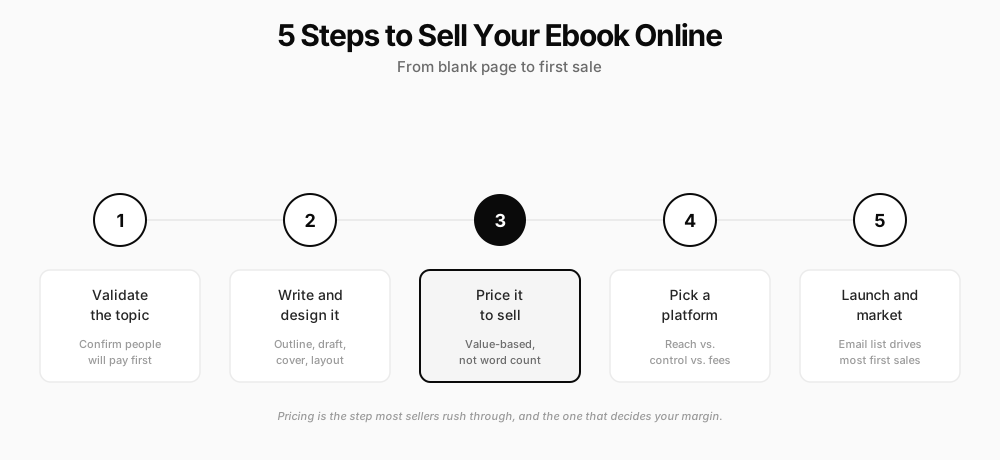
Step 1: Choose a Profitable Ebook Topic
Start with a problem you can already solve, not a topic you find interesting in the abstract. The gap between those two things is where most unsold ebooks come from.
Validate the idea before you write a word:
- Search existing demand: Look up your topic on Google Trends and check whether similar ebooks already sell on Amazon or Gumroad. Competition is a good sign; it means people are already spending money.
- Ask your audience directly: If you have any following at all, a simple poll ("Would you buy a guide on X for $Y?") beats guessing.
- Check the comments and reviews on adjacent products: One-star and three-star reviews on competing ebooks tell you exactly what buyers wish existed but do not.
A niche topic with a specific, painful problem outsells a broad topic every time. "How to negotiate a freelance rate increase" will sell better to freelancers than a generic "freelancing tips" ebook, even with a smaller addressable audience.
Step 2: Outline and Write Your Ebook
Once the topic is validated, work backward from the transformation the reader wants. A strong outline usually runs 8-15 chapters or sections, each solving one piece of the larger problem.
A few practical notes on the writing itself:
- Write conversationally: Ebook buyers are not grading you on academic prose. Short sentences and direct advice outperform dense paragraphs.
- Use AI as a drafting accelerator, not a ghostwriter: AI tools can turn your outline into a first draft fast, but readers can tell when a product is entirely AI-generated with no lived experience behind it. Use it to speed up structure and editing, and keep your specific examples and opinions in your own words.
- Add practical value beyond the text: checklists, templates, or worksheets increase perceived value and give buyers a reason to choose your ebook over a free blog post covering the same topic.
Step 3: Design a Professional Cover and Layout
Design is where a lot of otherwise-solid ebooks lose credibility. A cluttered cover or a wall of unformatted text signals "template dumped into a PDF" even when the content inside is excellent.
You do not need a design degree. Canva's ebook templates cover most needs: a clean cover with your title and a strong visual hook, consistent heading styles throughout, and generous white space so the PDF is comfortable to read on a laptop or a phone. Export at a reasonable file size (under 20-30MB in most cases) so buyers are not waiting on a slow download.
Step 4: Price Your Ebook Strategically
Pricing is the step most sellers rush, and it is the one with the biggest impact on total revenue. A $9.99 ebook needs roughly five times the buyers of a $49.99 ebook to hit the same revenue, and lower prices often attract less committed readers who are more likely to request refunds or never finish the book.
 Rough market ranges by depth:
| Ebook Type | Typical Price Range |
|---|---|
| Short guide or checklist bundle (under 30 pages) | $9-$19 |
| Standard how-to guide (30-80 pages) | $19-$49 |
| In-depth system or framework with templates | $49-$149 |
| Fiction novel | $2.99-$9.99 |
Price based on the outcome the ebook delivers, not the number of hours it took you to write. A guide that helps a freelancer land one $3,000 client is easily worth $49-$97, regardless of whether it took a weekend or three months to write. For a complete framework covering value assessment, cost analysis, and price testing, see our guide on how to price your digital products.
Step 5: Choose Where to Sell Your Ebook
This decision trades off three things: discovery, control, and fees. No platform wins on all three.
 Amazon KDP puts your ebook in front of the largest browsing audience of any option here. Amazon pays a 70% royalty on ebooks priced between $2.99 and $12.99 (after a per-download delivery fee), and 35% outside that range, per Amazon's official KDP royalty terms. The tradeoff is that you are renting shelf space in someone else's store: you cannot capture the buyer's email, you compete on Amazon's algorithm, and you give up direct customer data.
Gumroad charges a flat 10% plus $0.50 per sale on top of card processing, with no monthly fee and no plan tiers. It is the simplest way to start selling direct with your own audience and no setup overhead.
Payhip scales from a free plan (5% transaction fee) up to a $99/month Pro plan with 0% fees, and bundles email marketing and affiliate tools into every tier, which matters if you want to grow beyond a single ebook.
Sellfy charges $0 per transaction but requires a monthly subscription ($22-$159/mo depending on revenue volume), so the math favors sellers who are already moving consistent volume rather than testing a first ebook. If your audience lives on social media rather than search, see how Sellfy's storefront model stacks up against a link-in-bio-first platform in our Sellfy vs Stan Store comparison.
Etsy has become a legitimate channel for templates, planners, and short guides, thanks to built-in marketplace search traffic, though it charges a 6.5% transaction fee plus separate payment processing and listing fees.
If your ebook is a standalone product and reach matters most, KDP or a marketplace like Etsy is worth testing alongside a direct-sale platform. If you are building a broader digital business around your expertise, and the ebook is one product among several (courses, templates, a membership), a dedicated storefront platform makes more sense than juggling five separate accounts. Our guide to essential tools for digital product creators covers the surrounding stack: design, analytics, and delivery.
Step 6: Market and Launch Your Ebook
A finished ebook with no marketing plan sells to nobody. Build the audience before, during, and after launch:
- Start an email list before you finish writing: A simple landing page with a free excerpt or checklist in exchange for an email address gives you a list to launch to on day one.
- Give it a real launch week: Announce it, offer a short-term launch discount, and ask early buyers directly for a testimonial you can use on the sales page.
- Repurpose the content: Turn chapter summaries into social posts, pull one framework into a free blog post that links back to the full ebook, and mention it in every relevant conversation with your audience.
- Keep selling after launch week: SEO content and consistent social posting compound over months. Most ebook revenue after the first two weeks comes from ongoing marketing, not the launch itself.
Protecting Your Ebook (Realistically)
No PDF is fully piracy-proof, and it is worth being honest about that instead of overselling any single fix. A few things genuinely help without turning your buying experience into a hassle:
- Watermark the file with the buyer's name and order ID so a leaked copy is traceable back to a source, which discourages casual redistribution without inconveniencing legitimate buyers.
- Price fairly relative to the value delivered. Most piracy of ebooks happens when buyers feel a price is unreasonable, not out of malice. A fairly priced, genuinely useful ebook gets pirated far less than an overpriced one.
- Keep improving the product. A pirated PDF is a snapshot. If you update your ebook with new chapters or a refreshed edition, paying customers who bought through your platform get the update automatically; pirated copies do not.
Selling Ebooks With an AI Business Builder
If your ebook is the first product in a bigger plan, rather than a standalone side project, it is worth considering a platform built around the whole business instead of just the file transfer. Crevio is an AI business builder: you describe what you want to sell, and it builds the storefront, product page, and checkout for you.
For ebooks specifically, Crevio's "Downloads" product type handles the delivery: you upload the PDF, set the price, and buyers get instant access after checkout through Stripe. It sits alongside Crevio's other product types (courses, links, and embeds), so an ebook can naturally expand into a mini-course or a bundle later without switching platforms.
Where Crevio fits and where it does not:
- It does not replace Amazon KDP's discovery. Crevio has no built-in marketplace or browsing audience the way Amazon does. You bring your own traffic, the same as with Gumroad or Payhip.
- It is not a dedicated ebook reader. There is no EPUB rendering or reading-progress tracking; buyers download a file and open it in whatever reader they already use, which fits PDF guides better than long-form fiction meant for e-readers.
- It is built for sellers who want more than one product eventually. If the ebook is a lead-in to a course, a membership, or a broader storefront, Crevio's AI handles the rest of that build rather than requiring a second platform.
| Plan | Monthly Price | Transaction Fee | AI Credits |
|---|---|---|---|
| Starter | Free | 5% | 250/mo |
| Pro | $20/mo | 2.5% | 1,000/mo |
| Business | $50/mo | 1% | 2,500/mo |
The free Starter plan supports up to 2 published products, enough to test whether an ebook sells before committing to a paid plan. As with every direct-sale platform in this guide, Crevio charges a transaction fee rather than 0%: the lowest is 1% on the Business plan, which is still well under Amazon's effective cut on the 35% royalty tier or Gumroad's 10% flat fee.
Common Mistakes When Selling Ebooks Online
- Pricing too low out of fear of rejection. A $4.99 ebook needs ten times the sales of a $49.99 ebook to hit the same revenue, and it attracts buyers who are less invested in actually using it.
- Publishing on one platform only. Testing Amazon KDP alongside a direct-sale page costs nothing extra and captures both discovery traffic and full-margin direct sales.
- Skipping the landing page. A generic product listing converts worse than a page that speaks directly to the reader's problem, includes a table of contents preview, and shows a testimonial.
- Not building an email list first. Sellers who launch to an existing list consistently outsell sellers relying entirely on social media reach on launch day.
- Treating the ebook as a one-time project. The best-performing ebooks get updated, re-launched with new content, and bundled with other products over time. Read more on how bundling boosts digital product sales.
- Ignoring reviews and testimonials. Social proof is one of the strongest conversion levers for a product buyers cannot preview before purchase.
FAQ
It varies enormously by niche, audience size, and pricing. A creator with a modest 1,000-person email list selling a $29 ebook to even a 3% conversion rate generates roughly $870 per launch. Sellers with a larger list or an evergreen marketing funnel (SEO content, affiliate partners) can generate consistent monthly income well beyond a single launch. The advantage over physical products is that your margin does not shrink as volume grows: your one-thousandth sale costs the same as your first.
No, not for direct sales through your own storefront, Gumroad, Payhip, or Crevio. An ISBN is only required if you want your ebook cataloged by libraries and some retailers, or if you are publishing widely through distributors like IngramSpark. Amazon KDP assigns its own free identifier (ASIN) automatically and does not require a separate ISBN for Kindle ebooks.
Amazon KDP is free to list on and pays a royalty rather than requiring an upfront fee, making it the lowest-barrier option for reach. For a direct-sale storefront with no monthly cost, Gumroad, Payhip's free tier, and Crevio's free Starter plan all let you list an ebook and start selling before paying anything, with the platform instead taking a percentage of each sale.
The platform you pick matters less than most sellers think. An ebook that solves a real, specific problem sells on Amazon, Gumroad, or a plain landing page. An ebook that does not, will not sell no matter how well the checkout is built.
Related Blog Posts
What will you sell today?
Describe what you want to sell — Crevio builds, launches, and grows it. Products, payments, and marketing, all on autopilot.
Start for free