Your business,
on autopilot.
One platform for creating, running and growing your business, powered by AI.
The Best Platforms to Sell Videos Online in 2026 (9 Compared)





The platform you host your video on decides how you get paid for it. Upload to YouTube and you're renting an audience you don't own, paid in ad pennies. Sell the same video through a dedicated platform and you can charge $50, $500, or a recurring subscription, and keep most of it. The nine platforms below cover every way people actually sell video today: one-off downloads, rentals, on-demand channels, cohort-based courses, and paid memberships.
- If you're selling one video or a small catalog, Gumroad or Sellfy get you a checkout link in an afternoon with no monthly fee to start.
- If you're running a video-on-demand channel or app, Vimeo and Uscreen are built specifically for streaming at scale.
- If video is one product inside a bigger course, membership, or storefront, a general-purpose platform (Podia, Thinkific, Whop, or an AI business builder like Crevio) will serve you better than a video-only tool.
Quick Comparison
| Platform | Best For | Starting Price | Fees | Free Plan |
|---|---|---|---|---|
| Vimeo | Indie video hosting & OTT | ~$12–20/mo | Plan-based + per-subscriber on OTT | Yes, limited |
| Uscreen | Branded VOD apps & memberships | $49/mo | 10% one-time (Starter), 5% (Growth+) | No |
| Podia | Courses, downloads & video bundled | $42/mo | 5% on entry plan, 0% above | 30-day trial |
| Thinkific | Structured video courses | $54/mo (~$40/mo annual) | 2.9% processing only | Free plan, limited |
| Gumroad | Single video sales, no monthly fee | $0/mo | 10% + $0.50 per sale | Yes |
| Sellfy | Digital storefront with video | $29/mo (~$22/mo annual) | 0% platform fee | 14-day trial |
| Whop | Paid communities with video content | $0/mo to list | ~2.7%+ per transaction | Yes |
| Patreon | Recurring video memberships | $0/mo to start | 5–12% by tier | Yes |
| Crevio | Video as part of a broader business | Free | 1–5% by plan | Yes |
Prices and fees change often; treat this as a starting point and confirm current numbers on each platform's own pricing page before you commit.
How to Choose: Match the Model First
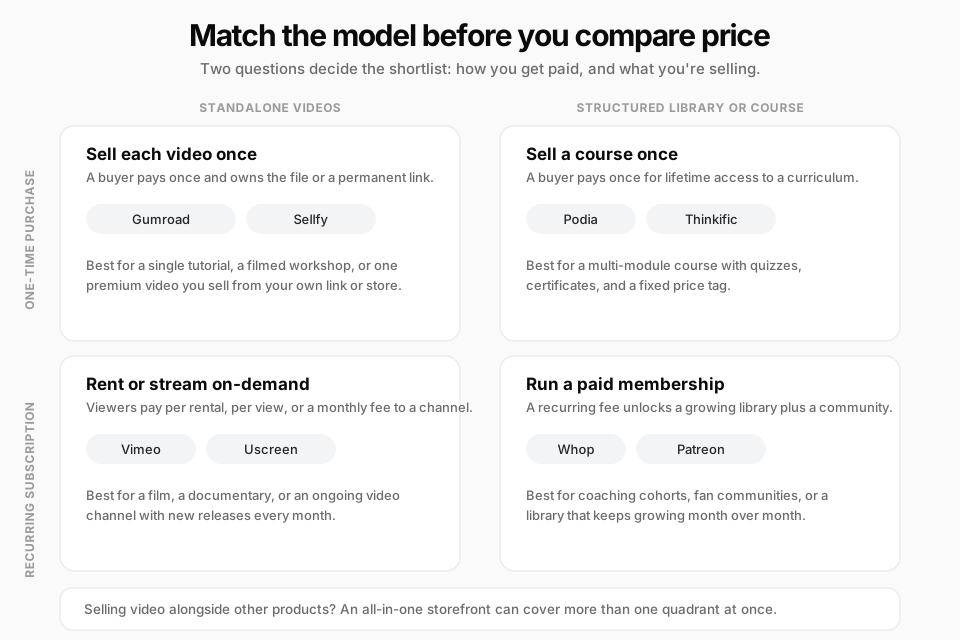
Most comparisons jump straight to feature lists. The faster filter is two questions: do you get paid once or every month, and are you selling a single video or a structured library? Answer those and the shortlist writes itself.
1. Vimeo
Vimeo is the platform most people think of first when they hear "sell video online," and for good reason: it's been a professional video host since long before YouTube monetization existed. Beyond hosting, Vimeo's OTT tier lets you sell videos as rentals, one-time purchases, or subscriptions through your own branded page.
 Vimeo's plan lineup has shifted more than once through 2026, with entry plans reported in the $12–20/month range and mid-tier plans landing around $25–41/month depending on billing cycle, on top of separate per-subscriber pricing once you turn on OTT monetization (see Uscreen's breakdown of Vimeo's current pricing for the specifics). Check Vimeo's own pricing page before you commit, since these numbers move.
Pros:
- Recognized, reliable video infrastructure with strong playback quality
- Flexible monetization: rent, buy, or subscribe
- Works well as an embed even if you sell the product elsewhere
Cons:
- Pricing has changed multiple times in the past year, which makes budgeting harder
- OTT monetization is a separate, additional cost layered on top of hosting
- Less built for community or engagement features than membership-first platforms
Best for: Indie filmmakers, documentarians, and anyone who wants professional-grade hosting with monetization bolted on, without building a full membership site.
2. Uscreen
Uscreen is a video-on-demand (VOD) and over-the-top (OTT) platform built specifically for creators who want a branded app, not just a hosted video. Fitness instructors, faith communities, and educators use it to build a "Netflix for their niche," with support for subscriptions, rentals, and one-time purchases inside one catalog.
According to Uscreen's pricing page, the Starter plan is $49/month for up to 100 subscribers with 20 hours of video storage and a 10% transaction fee on one-time sales. The Growth plan moves to $149/month (billed annually) with unlimited subscribers, a $1.99 per-subscriber fee, and a lower 5% transaction fee. Higher tiers add native mobile and TV apps.
Pros:
- Purpose-built for video businesses, not adapted from a generic tool
- Community features (challenges, DMs) on top plans keep members engaged
- No bandwidth overage fees as your library grows
Cons:
- Starter plan's 10% transaction fee is high relative to other platforms on this list
- Meaningful commitment: real growth requires the $149+/month tier plus per-subscriber costs
- Best value only shows up once you have real subscriber volume
Best for: Creators building a dedicated video-on-demand business who need branded apps and are ready to invest in a video-first platform.
3. Podia
Podia bundles video hosting into a broader course-and-community platform. You can sell standalone video downloads, package video into a structured course, or both, alongside coaching calls and a simple storefront.
Per Podia's pricing page, the Mover plan is $42/month and includes up to 500 videos with a 5% Podia transaction fee. The Shaker plan ($84/month) and Earthquaker plan ($150/month) remove Podia's transaction fee entirely and raise the video and product ceilings, though Stripe or PayPal's own processing fee (typically 2.9% + $0.30) still applies on every plan.
Pros:
- Video, courses, downloads, and community live in one tool, so you're not stitching platforms together
- Transaction fees disappear entirely above the entry tier
- Genuinely simple to set up; you can publish your first video product same-day
Cons:
- Not built for high-volume video-on-demand or streaming at Vimeo/Uscreen scale
- 500-video cap on the entry plan will feel tight for a growing library
- Design customization is more limited than dedicated site builders
Best for: Coaches and course creators who want video as one piece of a broader digital product business, not the whole business.
4. Thinkific
Thinkific is a course platform first, with video hosting built in as the delivery mechanism for lessons rather than the product itself. If your video content is really a curriculum, quizzes, certificates, and structured modules, Thinkific is built around that structure.
 Thinkific's pricing starts at $54/month (about $40/month billed annually) for the Basic plan, which includes unlimited courses and 100 GB of monthly bandwidth. Higher plans add live cohorts, assignments, and higher bandwidth ceilings. Thinkific charges no platform transaction fee; you pay standard card processing (around 2.9%) through Thinkific Payments, Stripe, or PayPal.
Pros:
- No percentage cut on sales beyond standard payment processing
- Strong course-building tools: quizzes, drip content, certificates
- Generous bandwidth limits that scale with plan tier
Cons:
- Pricier entry point than Podia or Gumroad for a first product
- Overkill if you're selling one video, not a course
- Community features are newer and less developed than dedicated membership tools
Best for: Educators and trainers whose video content is genuinely structured into a course, not a single asset.
5. Gumroad
Gumroad is the simplest way to sell a single video file or a small bundle. There's no monthly fee: you upload, set a price, and share a checkout link. Gumroad now acts as merchant of record, meaning it handles sales tax collection for you automatically.
 Per Gumroad's fee structure, direct sales through your own link cost 10% + $0.50 per transaction, with no monthly subscription at all. Sales sourced through Gumroad's own Discover marketplace carry a higher 30% cut, so most sellers link directly and skip that.
Pros:
- Zero monthly cost, so there's no financial risk trying it out
- Fastest path from "I have a video" to "I have a checkout link"
- Merchant-of-record tax handling removes a real compliance headache
Cons:
- 10% + $0.50 per sale adds up fast at volume compared to flat monthly plans
- Basic hosting and playback experience, not built for large libraries
- Limited course-structuring or membership tools
Best for: Anyone testing demand for a single video product before investing in a bigger platform.
6. Sellfy
Sellfy is a lightweight ecommerce storefront that happens to handle digital video downloads well, alongside print-on-demand merchandise and subscriptions. It's positioned as an all-in-one store rather than a video specialist.
Sellfy's pricing starts at $29/month (about $22/month billed annually) for the Starter plan, capped at $10k in annual sales, with 0% platform transaction fees on every tier (standard Stripe/PayPal processing still applies). Higher plans raise the sales cap and unlock features like cart abandonment recovery and affiliate marketing.
Pros:
- No transaction fee on top of the monthly plan, unusual among storefront tools
- Storefront and email marketing bundled in, useful if video is one of several products
- Reasonable entry price for a full store, not just a single checkout link
Cons:
- Annual sales caps on lower tiers mean successful sellers need to upgrade
- Not built for streaming or large video libraries the way Vimeo or Uscreen are
- Fewer community or engagement features than membership-first platforms
Best for: Sellers who want video alongside other digital or physical products in one simple store, without percentage fees. If you're also weighing a social-first, link-in-bio alternative, see our full Sellfy vs Stan Store comparison.
7. Whop
Whop started as a marketplace for digital communities and has grown into a broad platform for selling memberships, courses, and video content to a paid community. Sellers list a "whop" (their product or community) and members pay a one-time or recurring fee to join.
Whop's own fee schedule has changed more than once in 2026. Recent reporting puts checkout fees around 2.7% + $0.40 for direct sales, with a higher blended rate when Whop's billing and tax handling are used, on top of standard card processing (see this breakdown of Whop's current fees). There's no mandatory monthly plan to list a product.
Pros:
- No upfront monthly cost to start selling
- Built-in discovery marketplace can bring buyers you didn't have to find yourself
- Popular with younger, community-driven audiences (trading, gaming, coaching cohorts)
Cons:
- Fee structure has changed multiple times recently, so budget with a buffer
- Less suited to polished, long-form video libraries than community-style content drops
- Brand and audience skew toward internet-native communities, which may not fit every niche
Best for: Creators selling video as part of a paid community or cohort, especially where discovery through Whop's marketplace has real value.
8. Patreon
Patreon is built for recurring support, not one-off sales. Creators post video (alongside other content) behind a monthly membership, with tiered pricing for different levels of access.
Per Patreon's published creator plans, Patreon's platform fee runs roughly 5% to 12% depending on the plan tier you choose, on top of standard payment processing. There's no charge to set up a Patreon page itself.
Pros:
- Recurring revenue model that rewards consistent posting over time
- Strong existing audience habit: fans already expect to pay creators on Patreon
- No cost to start; fees only apply to what you earn
Cons:
- Not built as a video-hosting platform first; large libraries can feel clunky to browse
- Higher-tier fee percentages are steep if you pick the wrong plan
- Best suited to ongoing content, not a one-time video sale
Best for: Creators with an existing audience who want predictable recurring income from ongoing video content, not a single product launch.
9. Crevio (When Video Is Part of a Bigger Business)
Crevio is an AI business builder: you describe what you want to sell and Crevio's AI agents help build, launch, and grow it, covering courses, downloads, memberships, storefronts, and lead capture in one place.
To be direct about scope: Crevio is not a dedicated video-hosting or streaming platform the way Vimeo or Uscreen are. If your entire business is a video-on-demand channel with thousands of hours of footage, a video-specialist platform will serve you better. Where Crevio fits is different: video as one piece of a business built around courses and digital products. You can embed hosted video into a Crevio storefront through Embeds, or structure video lessons inside a Course product alongside downloads, pricing, and customer management, all on the same account.
Crevio's Starter plan is free, with a 5% transaction fee and 20 monthly AI credits. The Pro plan is $20/month (2.5% fee, unlimited products), and Business is $50/month (1% fee, custom domain, no Crevio branding). There's no dedicated "video hosting" line item because video is treated as content inside a product, not the product category itself.
Best for: Founders who want their video content, course, storefront, and customer list managed by one AI-assisted platform instead of stitching a video host, a course tool, and an email platform together.
What Nobody Tells You About Selling Video Online
The comparison charts make this look like a simple pricing decision. In practice, three things trip people up after they've already committed to a platform:
- Bandwidth and encoding costs hide in the fine print. A platform that looks cheap at low volume can add per-GB or per-subscriber fees once your library and audience actually grow. Read the overage terms, not just the headline price.
- Payment processing is a separate fee from the platform's own cut. Every platform on this list still routes card payments through Stripe, PayPal, or a similar processor, which takes its own 2.9%-ish slice regardless of what the platform itself charges. Budget for both.
- Migrating a video library later is expensive in time, not just money. Re-uploading hundreds of videos, rebuilding thumbnails, and redirecting old purchase links is a real cost that rarely shows up in a pricing comparison. Pick with room to grow rather than picking the cheapest option and planning to switch.
The platform is a distribution detail. The video still has to be worth paying for before any of this pricing math matters.
FAQ
Gumroad has no monthly fee at all, so it's the lowest-risk starting point if you're not sure how much demand exists yet. You'll pay 10% + $0.50 per sale instead of a flat monthly cost, which is more expensive at high volume but nothing if you sell zero.
If video is your entire business (a documentary, a fitness channel, a video-on-demand app), a specialist like Vimeo or Uscreen is worth the extra cost for streaming quality and playback reliability. If video is one product alongside courses, downloads, or a storefront, a general platform like Podia, Sellfy, or Crevio usually covers it without paying for streaming infrastructure you don't need.
There's no fixed rule; pricing depends on the format and audience. A single tutorial video commonly sells for $10 to $50, a structured video course for $50 to $500, and recurring memberships for video content typically range from $5 to $50 per month depending on how much new content you release. Our guide on pricing digital products walks through how to land on a number.
Related Blog Posts
What will you sell today?
Describe what you want to sell — Crevio builds, launches, and grows it. Products, payments, and marketing, all on autopilot.
Start for free